What it actually takes to keep a large AI training cluster healthy, productive, and cost-efficient
Get ₹2,000 free credits to test your AI workloads
Sign up and complete ID verification to unlock free credits. Deploy on NVIDIA H200, H100, and L40S GPUs—no commitment required.
Overview
Most conversations about AI focus on models, what they can do, how accurate they are, how to fine-tune them. Very few go into what happens after deployment: how do you keep a large cluster of expensive hardware running continuously, and what does it cost you when you don't?
This post covers the operational side of AI infrastructure, specifically the challenges around running large-scale training workloads reliably, what failure actually looks like at scale, and what teams need to do to maintain high utilization and stay within budget.
Key takeaways:
- At scale, hardware failures are statistically guaranteed not exceptional
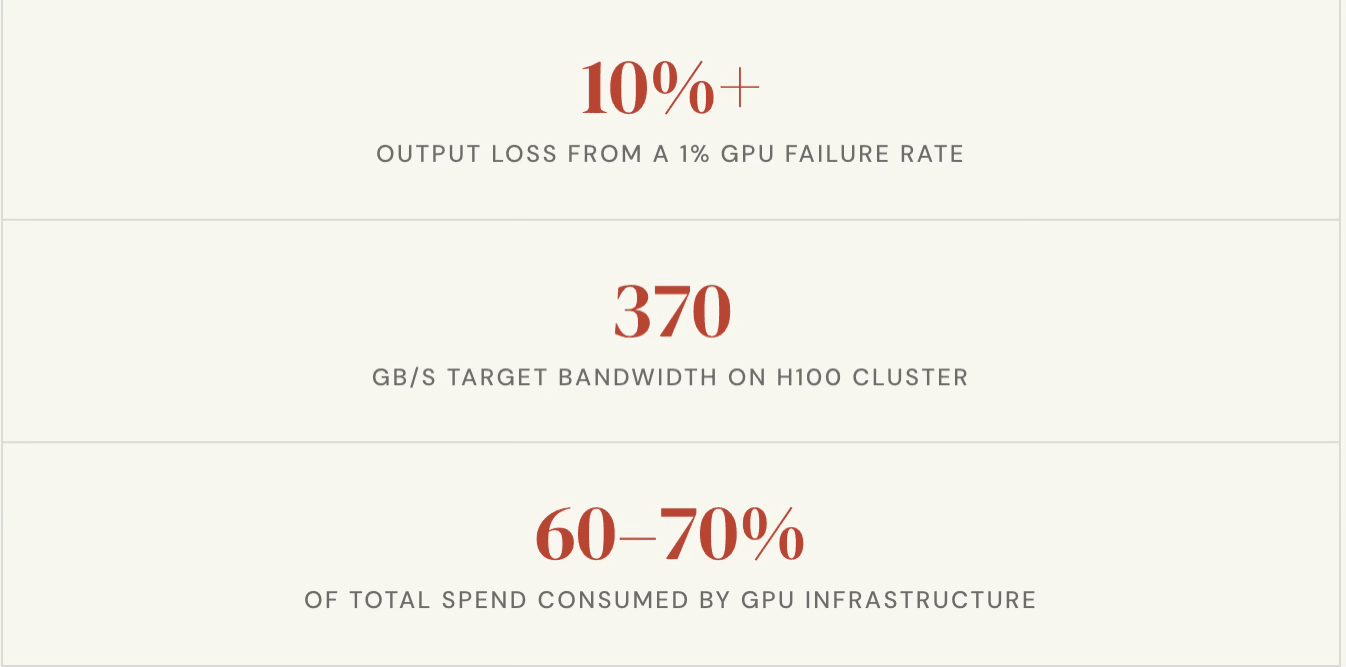
- A 1% GPU failure rate can translate to a 10% or more degradation in cluster output
- Two metrics compute utilization and inter-node bandwidth determine whether your cluster is productive or wasting money
- Resiliency is not optional; it is the foundation that determines whether your training timelines and GPU spend are under control
- The economics of AI infrastructure are fundamentally different from traditional software infrastructure can account for 60–70% of total spend
Get ₹2,000 free credits to test your AI workloads
Sign up and complete ID verification to unlock free credits. Deploy on NVIDIA H200, H100, and L40S GPUs—no commitment required.
1. Why Failures at Scale Are Inevitable
When running a fleet of high-performance computing hardware — whether it is hundreds or thousands of units — there is always a small statistical probability that some fraction of them will experience issues at any given time. This is not a flaw in the hardware; it is a consequence of running complex systems at maximum capacity for extended periods.
Each modern GPU card contains thousands of processing cores. The interconnect bandwidth between nodes in a high-end cluster can run into terabits per second. These systems operate at temperatures of 70–80 degrees Celsius under load. The probability that every single component across every single node stays healthy, continuously, over weeks of training — is not 100%.
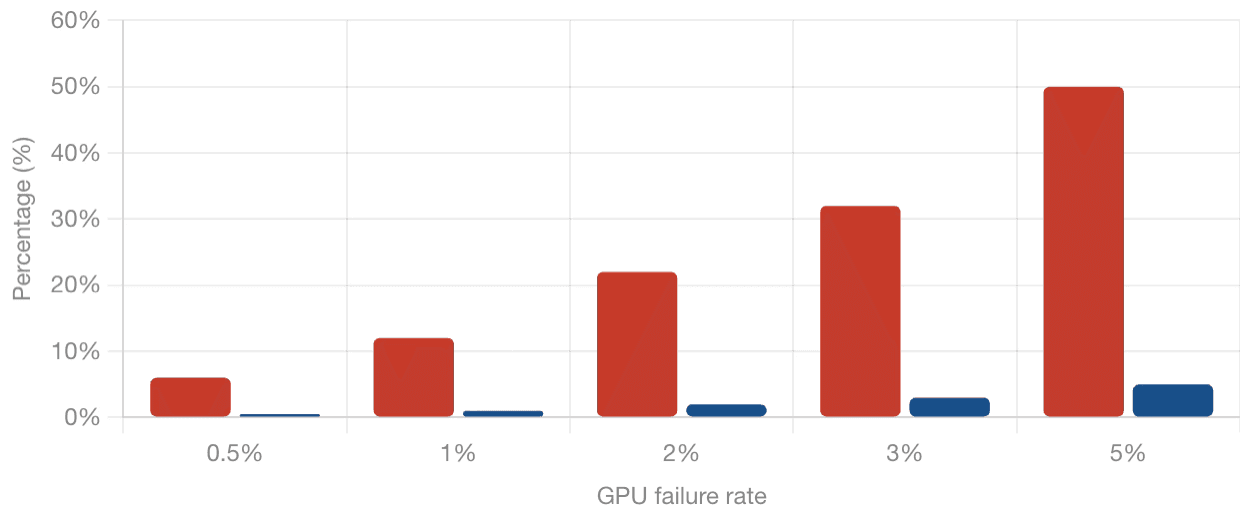
The practical implication: in a 1,000-GPU cluster with a 1% failure rate, ten GPUs may be experiencing issues at any given time. These ten GPUs are unlikely to be concentrated in one or two nodes. They will be spread across different boxes, creating isolated degradations across the cluster. The result is not a 1% drop in output — it can be a 10% or more effective degradation in overall throughput, because partial failures in a distributed training job affect coordination across all nodes.
This is not a reason to avoid large clusters. It is a reason to design for failure from the beginning.
2. Why Recovery Is Harder Than It Used to Be
In a traditional web infrastructure environment, redundancy is relatively cheap. You provision a few extra servers, and the cost overhead is manageable. If something fails, you spin up a replacement.
GPU infrastructure does not work that way.
High-performance compute nodes are significantly more expensive than general-purpose servers, and power requirements for large GPU clusters run into megawatts. Organizations cannot afford to keep large numbers of idle nodes on standby as warm spares. This means the burden shifts to real-time recovery — detecting problems as they happen, isolating affected components, and continuing work with the remaining healthy resources.
Every hour a cluster is down or underperforming is money lost. At the rates organizations pay for GPU infrastructure today, even a few hours of unplanned downtime can represent substantial cost.
"Netflix's Chaos Monkey randomly took servers offline without warning. The same principle applies to AI training — the real test is whether systems recover from failures nobody anticipated."
3. The Two Numbers That Tell You If Your Cluster Is Healthy
Across all the complexity of monitoring a large GPU cluster, two metrics stand out as the primary indicators of whether your infrastructure is operating as intended.
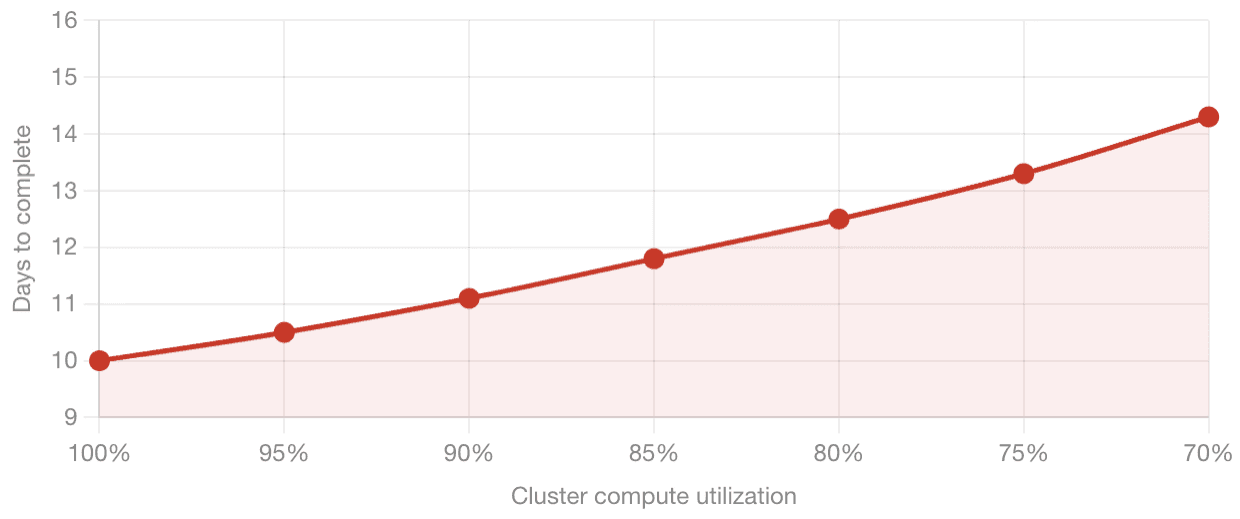
Compute utilization is a measure of how efficiently the cluster is using its available processing capacity. Reference benchmarks exist for what this number should look like on a well-configured cluster running a given model size. As a concrete example, training a 1 trillion token dataset on a 1,024-GPU cluster has published reference timelines. The moment your cluster's effective utilization drops below the benchmark — because nodes are failing, jobs are restarting, or communication between nodes is degraded — those timelines stretch. A 10-day training run becomes 12 days, or 14 days. Every additional day has a direct cost in GPU hours.
Inter-node bandwidth captures how well the machines in the cluster are communicating with each other. Distributed training requires constant synchronization between nodes at very high speeds. On a well-configured H100 cluster, this runs at roughly 370 gigabytes per second effective aggregate bandwidth. On newer hardware, those numbers go higher. If a node is slow, if an interconnect is degraded, or if a network component is failing, this number drops — and the entire cluster slows with it.
4. What Resiliency Actually Looks Like
Building resilience into a GPU training environment is not a single action. It is a set of layered practices, each addressing a different category of failure.
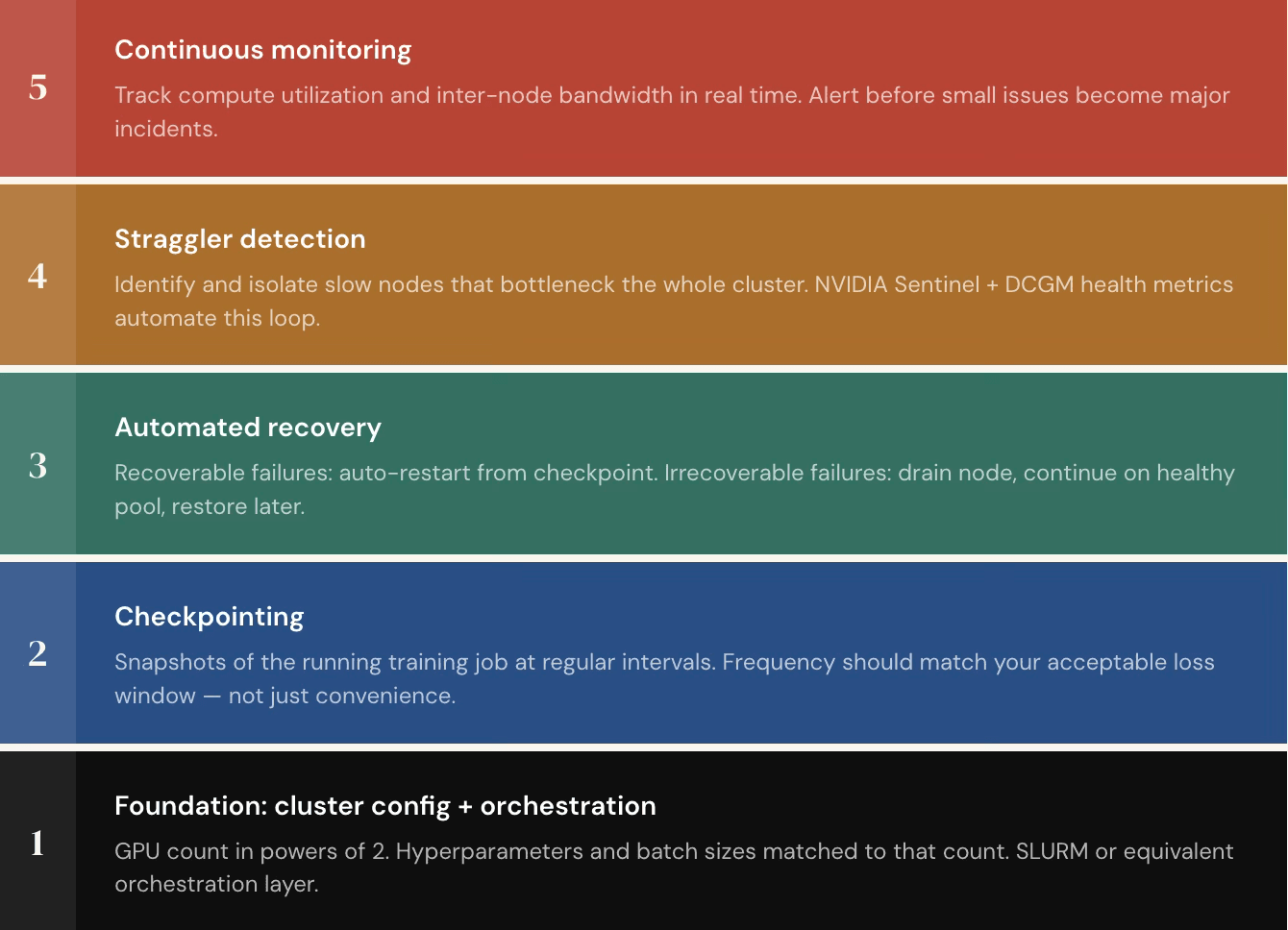
Checkpointing is the baseline. A checkpoint is a snapshot of a running training job saved at regular intervals. If something fails, whether a process crash or a hardware fault, training can resume from the last checkpoint rather than restarting from scratch.
Failures generally fall into two categories. Recoverable failures are things like a process being killed due to memory overload. The correct response is automatic detection and restart from the last checkpoint. Irrecoverable failures are things like a GPU overheating and going offline. Here, the approach is to drain the affected node from the active pool, continue training with the remaining healthy nodes, and restore the node once the issue is remediated. Done well, all of this runs automatically. Training jobs continue around the clock without a person needing to intervene every time something goes wrong.
5. The Right Infrastructure Setup Before Any of This Works
Getting resiliency tooling right matters, but it builds on a foundation that has to be correct first.
GPU training does not run on arbitrary node counts. Distributed training frameworks require the number of GPUs to follow specific ratios — powers of two, typically. Trying to run on 19 GPUs or an otherwise non-standard count will produce unpredictable behavior even if the hardware is perfectly healthy. Right-sizing the cluster and matching hyperparameters, batch sizes, and data loader configurations to that count is the starting point.
Using well-tested orchestration frameworks rather than entirely custom scripts is also important. Frameworks designed for distributed training handle many common failure modes — invalid memory access errors, out-of-memory kills, and similar issues — without requiring the training team to write recovery logic from scratch.
Only once these foundations are in place does the resiliency stack described above produce reliable results.
6. The Economics: Why This Is a CFO-Level Problem
The financial structure of AI-native organizations is fundamentally different from traditional software businesses.
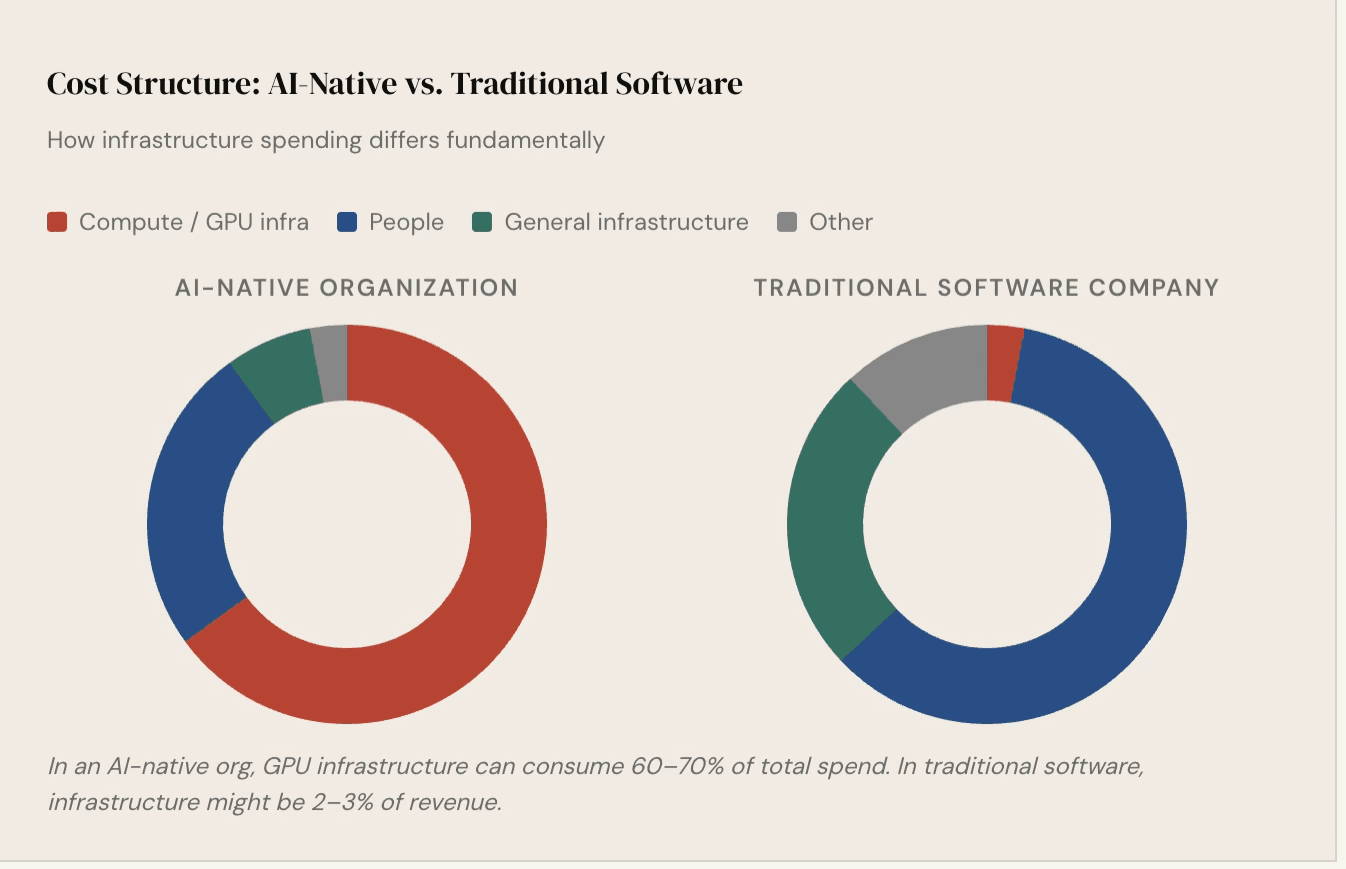
This means GPU utilization is not just an engineering metric — it is a direct input to the business's financial health. Organizations that are not hitting their utilization targets are burning money on idle or underperforming hardware. In response, many organizations now have finance teams actively monitoring GPU utilization numbers and pulling back allocations from teams that are not hitting their targets. The stakes are high enough that this is a CFO-level conversation, not just an infrastructure team concern.
It also changes how organizations think about when to run their own dedicated infrastructure versus consuming compute as a service. For straightforward workloads building applications on top of existing models, prototyping, or light fine-tuning consuming compute on demand is practical and cost-effective. But for organizations building proprietary models, working with sensitive data that cannot leave controlled environments, or operating in regulated industries like financial services or insurance, dedicated infrastructure becomes a requirement.
7. Key Takeaways for Teams Building on GPU Infrastructure
- Assume failure will happen. Design recovery into the system from the start, not as an afterthought.
- Checkpoint frequently. The frequency should match your tolerance for lost work, not just what is convenient.
- Monitor compute utilization and inter-node bandwidth continuously. These are your primary signals that something is wrong before it becomes a major incident.
- Automate recovery. Manual intervention does not scale. Systems should detect failures, isolate them, and resume without waiting for a person to act.
- Right-size your cluster configuration. Running the wrong GPU count or misconfigured parameters will hurt your metrics even when the hardware is healthy.
- Treat GPU spend as a core business metric. At the cost levels involved, underutilization is not a minor inefficiency — it directly affects whether a training run stays within budget.