Get ₹2,000 free credits to test your AI workloads
Sign up and complete ID verification to unlock free credits. Deploy on NVIDIA H200, H100, and L40S GPUs—no commitment required.
What Nobody Tells You
Key takeaways from a talk at the MLDS event on GPU inference optimization covering model tuning, concurrency, request routing, and real-world case studies from the E2E TIR platform team.
Everyone has access to the same frontier models now. So where does the actual competitive edge come from? According to the team behind E2E Cloud TIR platform (an end-to-end AI development platform), the answer is increasingly about how efficiently you can serve that intelligence at scale.
At a recent MLDS event, the team shared a practical framework built from working with dozens of AI product teams across India. Here's what they learned.
The three metrics that actually matter
When you strip away the hype, production AI performance comes down to three numbers:
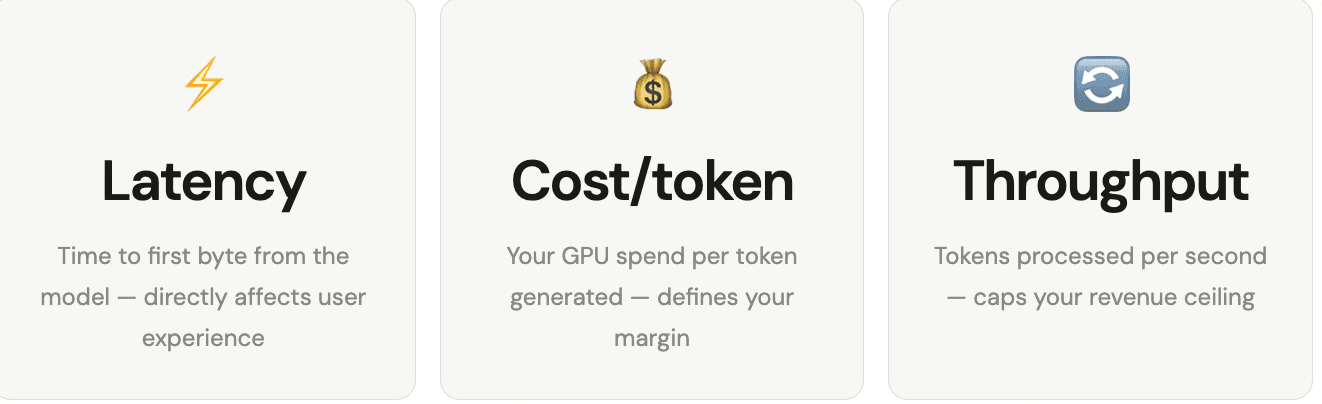
The key insight: Your revenue will always be limited by how much you can utilize your GPUs. Throughput is not a technical detail, it's your top line.
Get ₹2,000 free credits to test your AI workloads
Sign up and complete ID verification to unlock free credits. Deploy on NVIDIA H200, H100, and L40S GPUs—no commitment required.
The optimization stack (work through it sequentially)
You don't need to optimize everything on day one. Think of it as a layered approach where you work from the top down as your scale grows.
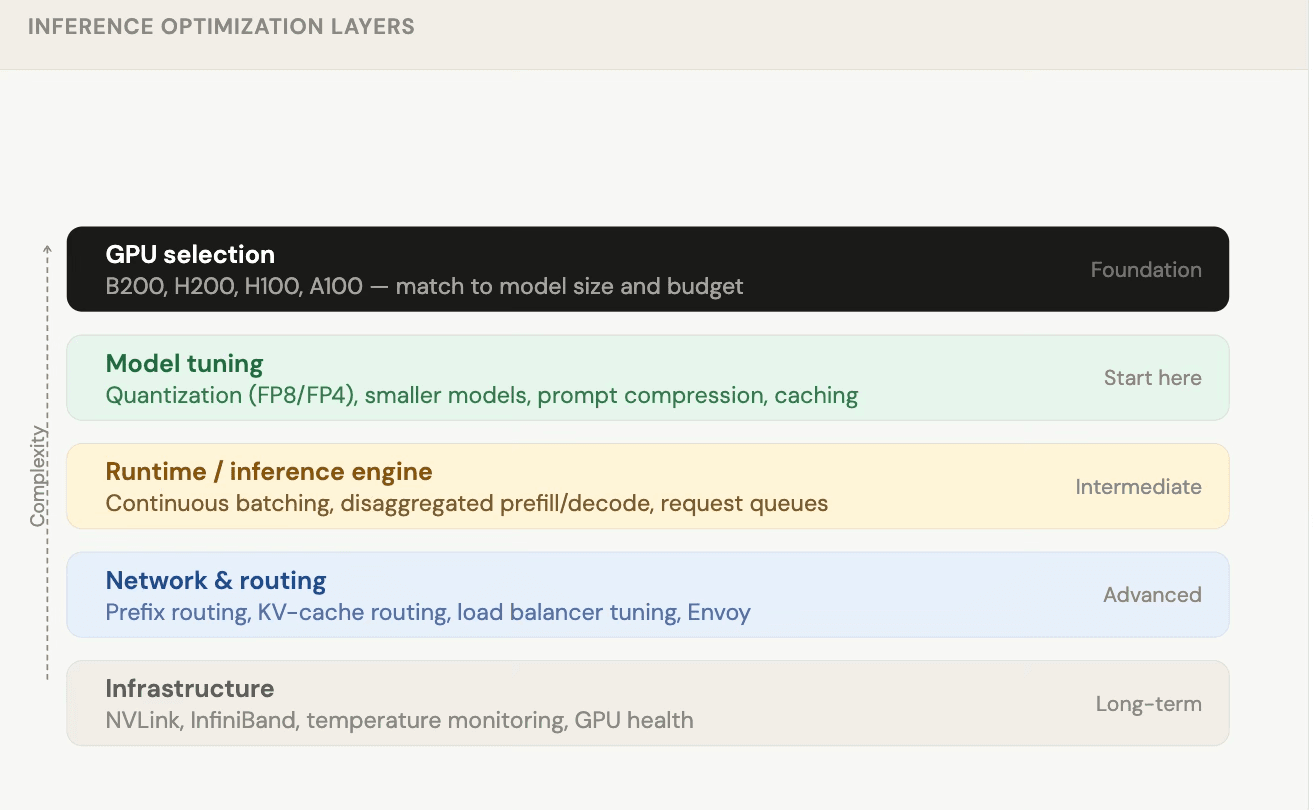
Layer 1: Model tuning (start here)
Quantization the easiest win
Quantization means storing model weights in a shorter data format. It sounds like a compromise, but for models above 30B parameters, the quality loss is often negligible.
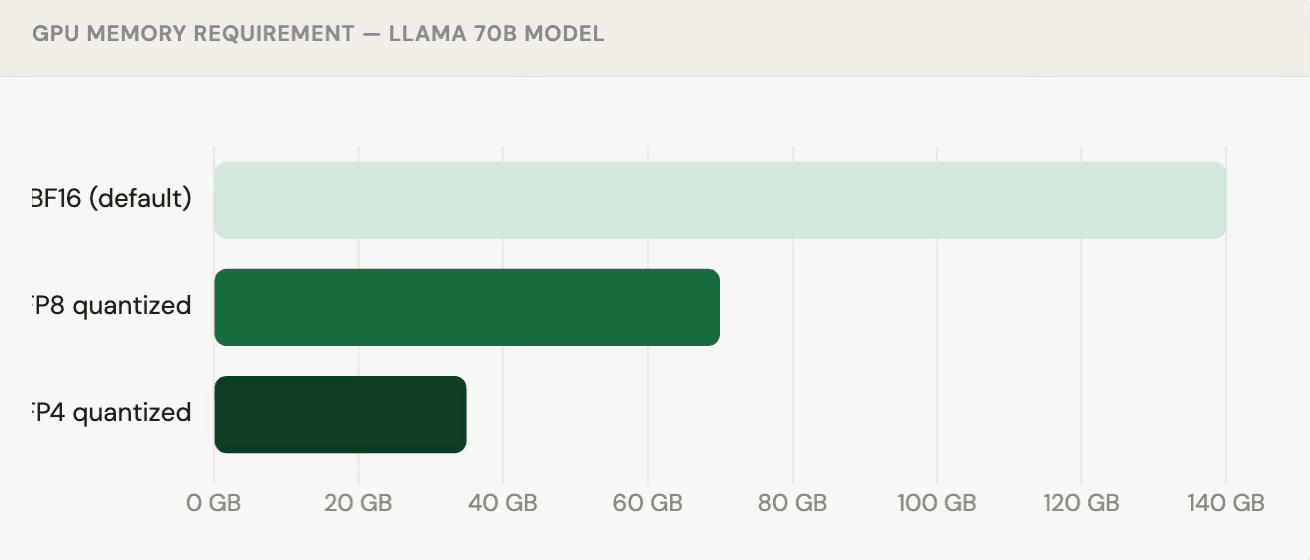
Real example: DeepSeek was trained and served entirely in FP8 format and it's still one of the leading models in benchmark rankings. Quantization is no longer a compromise; it's standard practice.
Smaller models
Before accepting a large model's resource footprint, always test a smaller alternative. Recent models like Nemotron-3 30B use a Mixture-of-Experts (MoE) architecture similar to DeepSeek and Qwen and often punch well above their parameter count.
Testing tip: Build a benchmark spreadsheet with 40–50 hard, domain-specific questions. Test full-size vs quantized vs smaller models on the same set. You'll often be surprised by the results.
Layer 2: The inference engine
Once your model is right-sized, the next question is: are you getting all the concurrency your GPU can deliver?
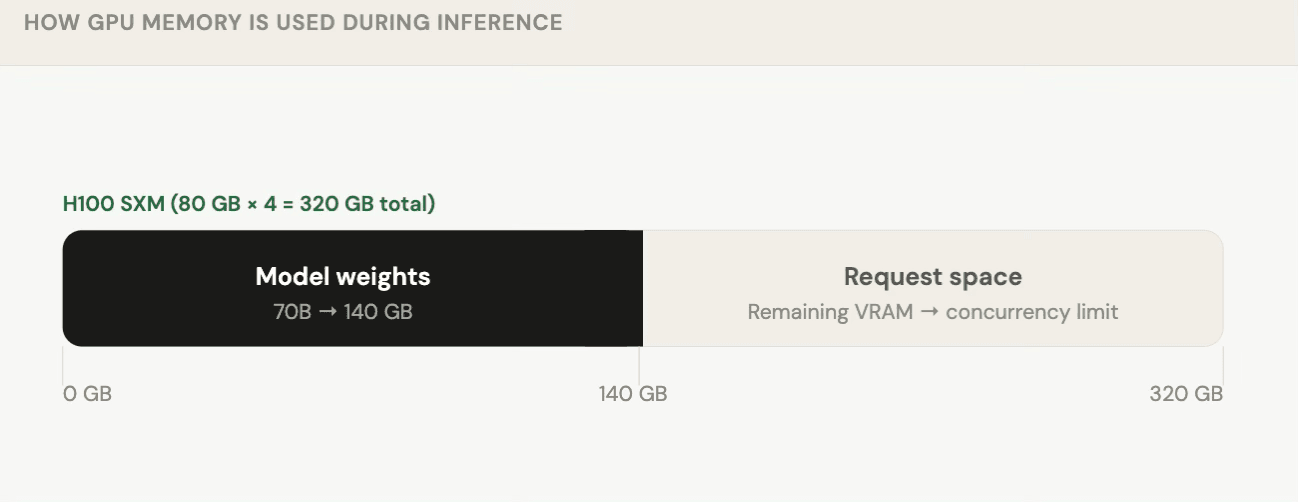
The concurrency limit of your deployment is defined by how much VRAM is left after the model loads. This is why the world can't infinitely scale AI every GPU worker has a hard ceiling on simultaneous requests.
Key runtime techniques
-
Continuous batching
Instead of waiting for a full batch, process requests as they arrive. This dramatically improves GPU utilization and reduces average latency. -
Priority queuing
Route paid or premium users to a priority queue so they always get lower latency without over-provisioning for everyone. -
Disaggregated prefill / decode
When input prompts are long but responses are short (e.g. RAG over documents), separate the "understanding" phase (prefill) from the "generation" phase (decode) onto different workers. NVIDIA Dynamo enables this today.
Case studies from the field
Case study 1 - Auto-scaling boot time
Problem: Llama 3 INT4 model took 2 minutes to boot on a new worker during traffic spikes by which time the spike was already over.
Solution: Saved the full GPU process context and restored from it on startup.
Result: Boot time dropped from 2 minutes → 20 seconds.
Case study 2 - Gemma 27B GPU scaling
The team tested Gemma 27B across different GPU configurations to find the optimal cost/latency tradeoff:
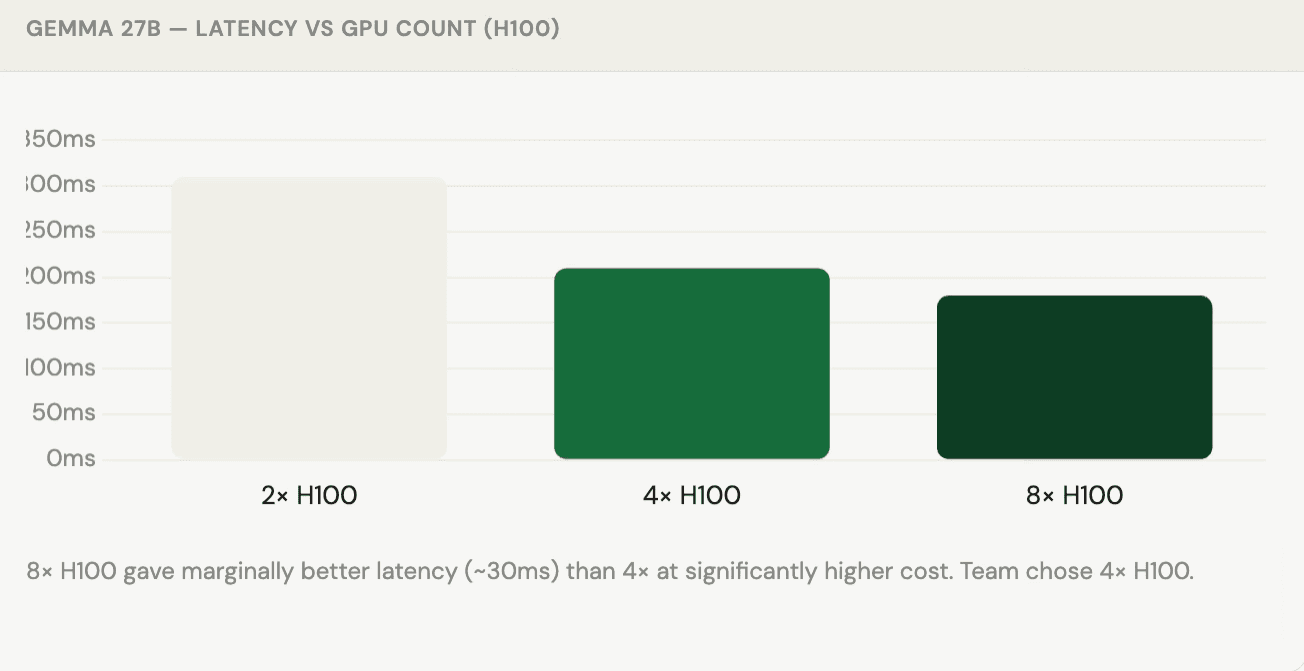
"Knowing these numbers makes a lot of difference; it's a conscious choice you're making, not just guessing."
Case study 3 - 10 billion tokens per day
Setup: 48× H200 GPUs running, targeting 10B tokens/day in throughput mode.
Finding: Workers were only receiving ~10% of their capacity in requests the bottleneck was entirely on the client side, not the GPUs.
Fix: Added a client-side request queue and monitoring to ensure GPU workers stayed saturated.
Layer 3: Network and routing
When you're targeting sub-300ms latency, every hop in the request path matters.
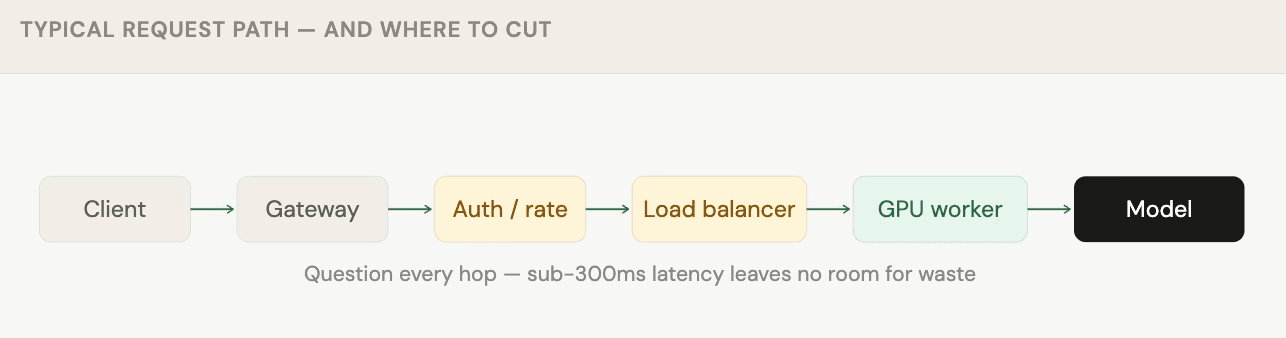
Prefix / KV-cache routing
Instead of round-robin routing, smart load balancers check whether a GPU worker has already processed a similar prompt prefix. If it has, it still holds the KV-cache for that prefix, and the request costs significantly less compute.
Important caveat: Prefix caching only works when prompts share a common prefix. If your system prompt or document always comes first and stays constant, you benefit. If prompts are highly unique or variables appear at the start, caching won't help much.
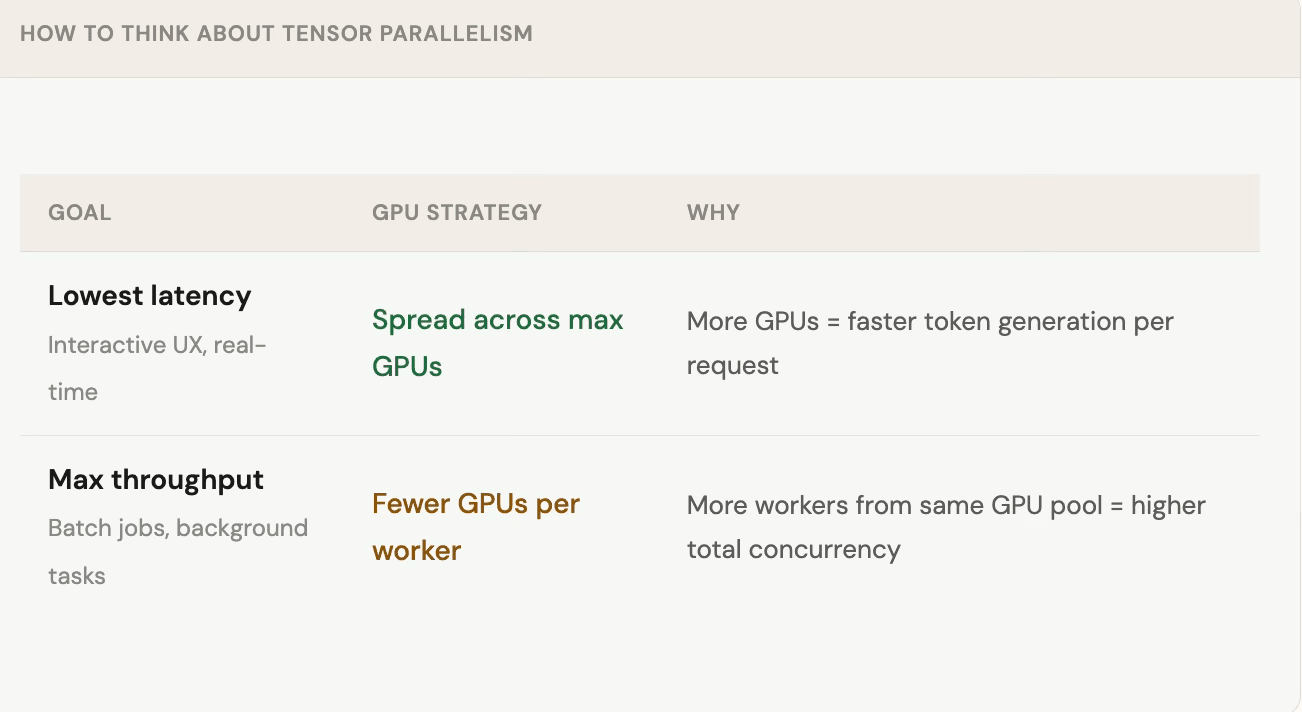
Latency vs throughput: choosing your GPU split
Don't forget the client side
Server optimization only helps if the client is feeding the server correctly. A common mistake: sophisticated GPU setups underutilized because requests arrive in bursts or only to one worker.
-
Add a client-side queue
Buffer requests on the client and release them at a steady rate that matches worker capacity. Don't rely on the inference engine to absorb spikes — it will take everything and choke other workers. -
Monitor request distribution
Track which workers are receiving requests. Imbalanced load (80% to worker 1, 20% to worker 2) wastes capacity and inflates costs. -
Use gRPC for real-time workloads
For STT/TTS or streaming use cases, gRPC outperforms REST lower overhead and native streaming support.
The bigger picture: shared AI infrastructure
One underrated optimization: consolidate model usage across teams. If your DevOps team, product team, and data team are all calling separate AI endpoints with different prompts on different infrastructure, you're paying a steep inefficiency tax.
"A lot of teams are trying to build an AI factory within their company, one model infrastructure, one API, multiple use cases. That's where economics starts to make sense."
Getting multiple internal teams onto a shared model layer is hard organizationally, but the TCO improvement can be significant especially for enterprises where a dedicated SaaS model isn't viable due to data privacy requirements.
Quick reference: where to start
Decision guide — what to optimize first
| Your situation | First move |
|---|---|
| Using a commercial API (OpenAI, Claude, etc.) | Try an open-source model on your eval set first |
| Running a 70B+ model on multiple GPUs | Quantize to FP8 likely zero quality loss |
| Latency is high but GPU utilization is low | Check client-side request pacing and queue depth |
| Throughput plateau despite adding GPUs | Profile concurrency per worker model may not be saturated |
| Long prompts + short responses (RAG) | Explore disaggregated prefill/decode setup |
| Auto-scaling with cold start problems | Checkpoint GPU process state for faster restores |