Get ₹2,000 free credits to test your AI workloads
Sign up and complete ID verification to unlock free credits. Deploy on NVIDIA H200, H100, and L40S GPUs—no commitment required.
Introduction
Choosing the wrong GPU can cost you 2-3x more than necessary. Or leave 50% of performance on the table. Today, GPU selection is a strategic decision, not just a technical one.
Three NVIDIA GPUs dominate AI infrastructure today: the A100 (launched 2020, Ampere architecture), H100 (2022, Hopper architecture), and H200 (2024, Hopper with HBM3e memory). Each serves different workloads at different price points, and picking incorrectly burns either money or time.
Here's what changed recently that makes this comparison worth revisiting:
-
The A100 is end-of-life. NVIDIA stopped production, which means supply is finite and shrinking. But the A100 isn't obsolete. For inference and mid-scale training, it delivers 80-90% of what most teams need at 70% of the H100's cost.
-
H100 pricing dropped roughly 50% since early 2024. Cloud providers added capacity, competition increased, and what was once scarce is now accessible.
-
The H200 is finally available. With 141GB of HBM3e memory (76% more than H100's 80GB), it unlocks workloads that were previously impractical: 100B+ parameter models, long-context inference, and large batch training without running out of VRAM.
The tricky part is that "faster" doesn't always mean "cheaper." An H100 completing a job in half the time might cost less total than an A100, even at a higher hourly rate. Conversely, if your workload fits comfortably in A100's memory, you're overpaying for H200's extra capacity.
E2E Networks offers all three GPUs in Indian data centers: A100 80GB at ₹226/hr (2.80), and H200 at ₹300/hr ($3.37). This guide helps you pick the right one for your workload, with concrete benchmarks, use-case frameworks, and the actual math behind the decision.
Let's start with what makes each GPU different at the architectural level.
Core Architecture Comparison
The A100, H100, and H200 represent two architectural generations and three different approaches to the same problem: how do you make AI workloads run faster?
The A100 (2020) introduced innovations that made large-scale AI training practical. The H100 (2022) redesigned the architecture specifically for transformer models. The H200 (2024) kept the same architecture as H100 but dramatically upgraded the memory system. Understanding these differences helps you avoid overpaying for capabilities you don't need, or underpaying and bottlenecking your workload.
Get ₹2,000 free credits to test your AI workloads
Sign up and complete ID verification to unlock free credits. Deploy on NVIDIA H200, H100, and L40S GPUs—no commitment required.
Ampere Architecture (A100)
The A100 launched in May 2020 and became the GPU that powered the modern AI boom. Built on NVIDIA's Ampere architecture with 54 billion transistors, it introduced innovations that defined how we train and run AI models today.
Third-Generation Tensor Cores and Mixed Precision Training
Tensor Cores are specialized hardware units designed for matrix multiplication, the core operation in deep learning. The A100's third-generation Tensor Cores made mixed-precision training practical at scale.
The standard approach for training on A100 is mixed-precision with BF16 or FP16. Here's how it works: you keep a master copy of weights in FP32 for numerical stability, but run the forward and backward passes in 16-bit precision. This gives you 312 TFLOPS of Tensor Core performance, 16x faster than pure FP32 (19.5 TFLOPS).
BF16 (bfloat16) is generally preferred over FP16 because it has the same exponent range as FP32, which means you don't need loss scaling to prevent gradient underflow. FP16 requires careful loss scaling because its smaller dynamic range can cause very small gradients to round to zero. Most modern frameworks default to BF16 when available.
The A100's Tensor Cores support a wide range of precisions: FP64 for scientific computing, BF16 and FP16 for mixed-precision training, and INT8 for inference. This flexibility made the A100 genuinely versatile across workloads.
Multi-Instance GPU (MIG)
MIG was a new capability that lets you partition a single A100 into up to seven isolated GPU instances. Each instance gets its own dedicated memory, cache, and compute resources, fully isolated at the hardware level.
This matters primarily for cloud providers and shared environments. Before MIG, if you wanted to run a small inference workload that only needed 10GB of memory, you still had to allocate an entire 80GB GPU. With MIG, you can carve out a 10GB slice and use the rest for other workloads. Each slice is truly isolated, meaning one user's workload can't impact another's performance or access their memory.
For individual developers, MIG is less relevant. But if you're running inference at scale or managing shared GPU infrastructure, it's a meaningful capability.
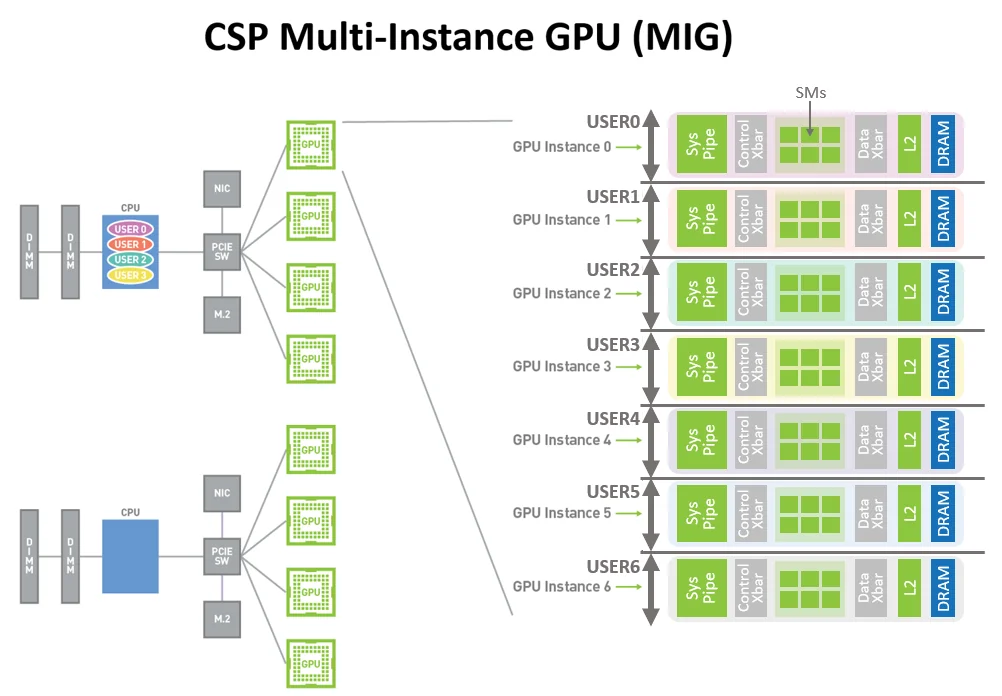
MIG allows multiple users to share a single A100, each with isolated compute and memory resources. (Source: NVIDIA Developer Blog)
Memory and Interconnect
The A100 80GB variant uses HBM2e memory with 2.0 TB/s of bandwidth. This was a significant jump from the previous V100 generation (900 GB/s), and it set the baseline for what came next. NVLink 3.0 connects multiple A100s at 600 GB/s bidirectional, enabling efficient multi-GPU training.
Hopper Architecture (H100)
The H100 arrived in late 2022 with a different design philosophy. While the A100 was a general-purpose AI accelerator, the H100 was purpose-built for transformer models.
Fourth-Generation Tensor Cores and FP8
The H100's Tensor Cores added native support for FP8, an 8-bit floating point format. This is half the bits of FP16, which means you can theoretically double your throughput for operations that can tolerate the reduced precision.
But FP8 isn't straightforward to use. With only 8 bits, the numerical range is limited. A single scaling factor that works for one tensor might cause overflow or underflow in another. NVIDIA's solution was to create two FP8 variants:
- E4M3 (4 exponent bits, 3 mantissa bits): Higher precision, smaller range. Good for weights and activations in the forward pass.
- E5M2 (5 exponent bits, 2 mantissa bits): Lower precision, larger range. Good for gradients in the backward pass.
The H100's Tensor Cores can mix these formats freely, so different parts of the network can use whichever format suits them best.
Transformer Engine
Even with two FP8 variants, managing precision manually would be tedious and error-prone. The Transformer Engine automates this entirely.
The Transformer Engine analyzes each layer of your model and determines the optimal precision. It runs matrix multiplications and linear layers in FP8 where safe, and automatically kicks up to FP16 for operations that need more precision (like normalization and softmax). It also handles the per-tensor scaling factors that FP8 requires, tracking the range of values in each tensor and adjusting the scale to prevent overflow or underflow.
From a developer's perspective, you wrap your model in a context manager and the Transformer Engine handles the rest. Your training code stays the same, but you get FP8 performance. The Transformer Engine also works for inference. Models trained with FP8 can run inference in FP8 directly, without needing to convert to INT8 like you would with older GPUs.
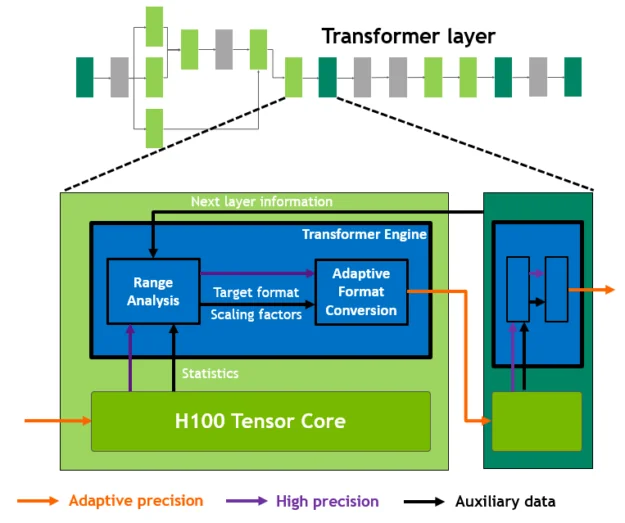
The Transformer Engine dynamically switches between FP8 and FP16 precision, automatically managing scaling factors for each layer. (Source: NVIDIA Developer Blog)
Compute and Memory Improvements
Beyond the Tensor Core changes, the H100 packs 80 billion transistors on TSMC's 4N process. Memory bandwidth jumped to 3.35 TB/s with HBM3 (67% faster than A100), and NVLink 4.0 increased to 900 GB/s (50% faster). Both matter for large-model training where data movement between GPUs becomes a bottleneck.
The result is substantial. NVIDIA reports up to 4x faster training for GPT-3 class models compared to A100.
A concrete example: Say your fine-tuning job takes 100 hours on A100 80GB at ₹226/hr (254). The same job on H100 typically completes in 40-50 hours (2-2.5x faster) at ₹249/hr (112-140). The "more expensive" GPU saves you 45-56% on total job cost because it finishes faster.
Hopper Enhanced (H200)
Here's the key thing about H200: it's not a new architecture. It uses the exact same Hopper architecture as H100. Same Tensor Cores, same Transformer Engine, same compute performance. If you run a compute-bound workload, H100 and H200 perform identically.
What changed is memory. The H200 packs 141GB of HBM3e at 4.8 TB/s bandwidth, compared to H100's 80GB at 3.35 TB/s. That's 76% more capacity and 43% more bandwidth.
This matters when memory is your bottleneck. Large language models during inference spend most of their time moving data from memory to compute units, not actually computing. Higher bandwidth means less waiting, which translates directly to more tokens per second. The extra capacity also means fitting larger models on fewer GPUs.
A concrete example: Running Llama 3.1 405B requires roughly 810GB of VRAM in FP16. On H100 (80GB each), you need at least 12 GPUs with tensor parallelism. On H200 (141GB each), you need 8 GPUs. At E2E pricing:
- 12× H100 at ₹249/hr (33.63)
- 8× H200 at ₹300/hr (26.98)
H200 costs 20% less per hour for the same workload, despite each GPU being more expensive. And 8 GPUs means simpler orchestration than 12.
But here's the flip side: if you're running Llama 7B or Mistral 7B, both GPUs have way more memory than you need. The workload is compute-bound, not memory-bound, so H100 and H200 perform the same. In that case, H100 at ₹249/hr (3.37).
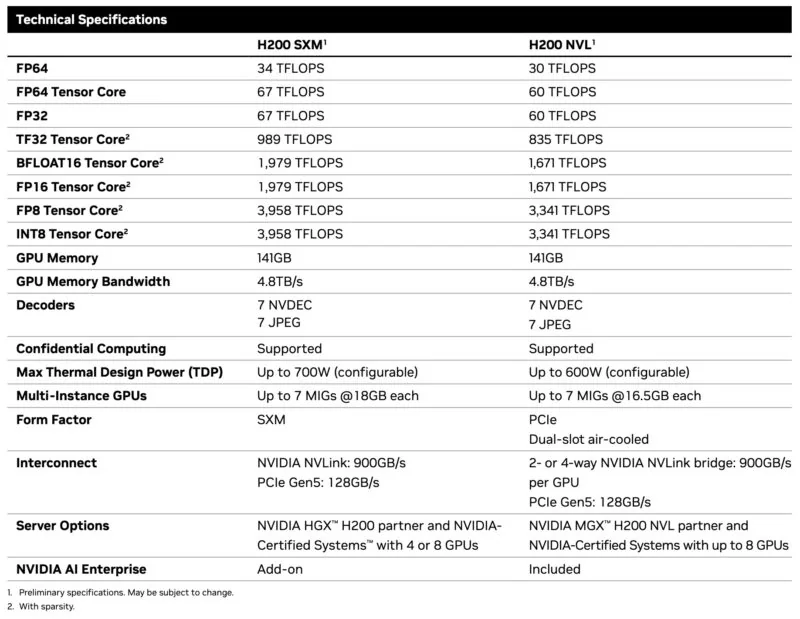
H200 specifications: 141GB HBM3e memory with 4.8 TB/s bandwidth (76% more capacity and 43% more bandwidth than H100). (Source: ServeTheHome)
The Progression
The evolution follows a clear pattern:
A100 → H100 was a compute upgrade. New architecture, FP8 support, Transformer Engine, higher bandwidth. For transformer workloads, H100 is roughly 2-3x faster than A100.
H100 → H200 was a memory upgrade. Same compute, more memory and bandwidth. For compute-bound workloads, they're identical. For memory-bound workloads, H200 pulls ahead.
This is why picking the right GPU isn't about finding the "best" one. It's about matching the GPU's strengths to your workload's bottlenecks.
We'll cover exactly how to make that decision in the use case framework section.
Now let's get into the exact numbers.
Specifications Deep-Dive
This section puts all three GPUs side by side. We're focusing on SXM variants since that's what E2E Networks and most cloud providers deploy for high-performance AI workloads. I'll note where PCIe variants differ meaningfully.
The Complete Picture
| Specification | A100 80GB SXM | H100 SXM | H200 SXM |
|---|---|---|---|
| Architecture | Ampere (GA100) | Hopper (GH100) | Hopper (GH100) |
| Process Node | 7nm (TSMC N7) | 4nm (TSMC 4N) | 4nm (TSMC 4N) |
| Transistors | 54.2 billion | 80 billion | 80 billion |
| CUDA Cores | 6,912 | 16,896 | 16,896 |
| Tensor Cores | 432 (3rd gen) | 528 (4th gen) | 528 (4th gen) |
| GPU Memory | 80GB HBM2e | 80GB HBM3 | 141GB HBM3e |
| Memory Bandwidth | 2.0 TB/s | 3.35 TB/s | 4.8 TB/s |
| L2 Cache | 40 MB | 50 MB | 50 MB |
| TDP | 400W | 700W | 700W |
| NVLink | 3rd gen, 600 GB/s | 4th gen, 900 GB/s | 4th gen, 900 GB/s |
The first thing to understand is that H100 and H200 use the exact same GH100 chip. Every CUDA core count, every Tensor Core spec, every compute throughput number is identical between them. The difference is purely in the memory subsystem: H200 pairs that chip with 141GB of faster HBM3e memory instead of 80GB of HBM3. This matters because it tells you exactly when H200 is worth the premium. If your workload is compute-bound, H100 and H200 perform identically. If your workload is memory-bound, H200 pulls ahead.
The A100 to H100 jump is a different story. NVIDIA moved from 7nm to 4nm manufacturing, increased transistor count by 48% (54.2 billion to 80 billion), and redesigned the Tensor Core architecture. The result is roughly 3x more compute throughput across every precision level, plus new capabilities like FP8 that A100 simply cannot do.
Compute Performance
All numbers below include sparsity, which is the standard for production inference. Dense performance is roughly half these figures.
| Precision | A100 80GB SXM | H100 SXM | H200 SXM |
|---|---|---|---|
| FP64 Tensor Core | 19.5 TFLOPS | 67 TFLOPS | 67 TFLOPS |
| FP32 | 19.5 TFLOPS | 67 TFLOPS | 67 TFLOPS |
| TF32 Tensor Core | 312 TFLOPS | 989 TFLOPS | 989 TFLOPS |
| BF16/FP16 Tensor Core | 624 TFLOPS | 1,979 TFLOPS | 1,979 TFLOPS |
| FP8 Tensor Core | Not supported | 3,958 TFLOPS | 3,958 TFLOPS |
| INT8 Tensor Core | 1,248 TOPS | 3,958 TOPS | 3,958 TOPS |
H100 delivers about 3x the compute throughput of A100 at every precision level. This comes from the combination of more CUDA cores (16,896 vs 6,912), faster fourth-generation Tensor Cores, and the architectural improvements in Hopper. For training workloads that are compute-bound, this translates directly to faster iteration.
The FP8 row deserves attention. A100 has no native FP8 support, so it cannot run these operations natively. H100 and H200 deliver nearly 4 petaFLOPS per GPU at FP8 precision. Many LLM inference workloads can run at FP8 with minimal accuracy loss, which means you get roughly double the throughput compared to BF16 on the same hardware. The Transformer Engine in Hopper manages FP8 precision automatically, handling the scaling factors and precision switching that would otherwise require manual tuning.
Memory Subsystem
Memory specs explain most of the real-world performance differences you'll see, especially for inference workloads.
| Memory Spec | A100 80GB SXM | H100 SXM | H200 SXM |
|---|---|---|---|
| Capacity | 80GB | 80GB | 141GB |
| Type | HBM2e | HBM3 | HBM3e |
| Bandwidth | 2.0 TB/s | 3.35 TB/s | 4.8 TB/s |
| Stacks | 5 × 16GB | 5 × 16GB | 6 × 24GB |
The progression from HBM2e to HBM3 to HBM3e represents three generations of high-bandwidth memory. Each generation increases both capacity per stack and signaling rate per pin. H100's move to HBM3 delivers 67% more bandwidth (2.0 TB/s to 3.35 TB/s) while keeping the same 80GB capacity. H200's upgrade to HBM3e adds a sixth memory stack, pushing capacity to 141GB (76% more than H100) and bandwidth to 4.8 TB/s (43% more than H100).
For LLM inference, memory bandwidth is often the bottleneck. Token generation requires reading model weights for every forward pass, and the speed at which you can stream those weights from memory determines how fast you generate tokens. The 67% bandwidth jump from A100 to H100 translates to roughly 1.5-2x faster inference on large models. The additional 43% from H100 to H200 provides another meaningful boost, particularly for long-context workloads where KV cache sizes grow large.
Memory capacity creates hard boundaries on what you can run. A single A100 or H100 can hold models up to roughly 35-40B parameters in BF16 with room for KV cache and activations. For 70B models in BF16, you need tensor parallelism across at least two 80GB GPUs—the weights alone take 140GB, plus you need headroom for KV cache and activations. H200's 141GB changes this math when combined with FP8 precision. A 70B model in FP8 needs only 70GB for weights, leaving 71GB for KV cache and activations. This eliminates the communication overhead of tensor parallelism and simplifies deployment.
Multi-GPU Scaling
When you scale beyond a single GPU, interconnect bandwidth determines how much the communication overhead slows you down. Training large models requires gradient synchronization across all GPUs, and slower interconnects mean more time waiting.
| Interconnect | A100 SXM | H100 SXM | H200 SXM |
|---|---|---|---|
| NVLink Generation | 3rd | 4th | 4th |
| NVLink Bandwidth | 600 GB/s | 900 GB/s | 900 GB/s |
| PCIe | Gen 4, 64 GB/s | Gen 5, 128 GB/s | Gen 5, 128 GB/s |
The 50% increase in NVLink bandwidth from A100 to H100/H200 reduces the communication bottleneck in distributed training. For an 8-GPU training run, faster gradient synchronization means better scaling efficiency. You spend more time computing and less time waiting for data to move between GPUs. The jump to PCIe Gen 5 doubles host-to-device bandwidth (64 GB/s to 128 GB/s), which helps with data loading and CPU-GPU communication.
Power and Efficiency
H100 and H200 consume 75% more power than A100 (700W vs 400W). But they deliver more than 3x the compute throughput, so on a performance-per-watt basis, Hopper is significantly more efficient than Ampere for compute-bound workloads. If you're paying for electricity at data center rates, the newer GPUs cost less per unit of actual work done.
H200's extra memory comes at no additional power cost compared to H100. You get 76% more VRAM within the same 700W envelope. This makes H200 particularly efficient for memory-bound workloads where the alternative would be running multiple H100s.
PCIe vs SXM Variants
The specs above focus on SXM variants. PCIe versions exist for both H100 and A100, and they differ in important ways. The H100 PCIe uses a cut-down chip with 14,592 CUDA cores instead of 16,896, and it pairs with HBM2e instead of HBM3. Memory bandwidth drops to 2.0 TB/s, and TDP falls to 350W. Raw compute performance is roughly 24% lower than SXM, but for memory-bound workloads like LLM inference, the 40% bandwidth reduction means real-world performance gaps of 40-60%.
Major cloud providers (AWS, Google Cloud, Azure) deploy SXM variants in their multi-GPU instances because the performance advantage justifies the higher power and cooling costs at their scale. Smaller providers often offer both PCIe and SXM variants. When you rent GPUs from E2E Networks, you're getting SXM-class performance.
What This Means for Your Workloads
Raw specifications translate to real-world performance differently depending on what you're doing.
For LLM inference, memory bandwidth matters most. H100's 67% bandwidth increase over A100 shows up as 1.5-2x faster token generation for large models. H200's additional 43% bandwidth boost provides another meaningful improvement, especially when you're running long contexts that create large KV caches.
For training, both compute throughput and interconnect bandwidth matter. H100's 3x compute improvement over A100 directly reduces training time for compute-bound phases. The 50% NVLink bandwidth increase improves multi-GPU scaling efficiency by reducing communication overhead.
For large models above 70B parameters, memory capacity becomes the deciding factor. A100 and H100 both cap at 80GB, so you need tensor parallelism across multiple GPUs. H200's 141GB can fit many of these models on fewer GPUs, which reduces complexity and eliminates cross-GPU communication for the tensor parallel dimension.
The next section covers real-world benchmarks that put these specifications into practical context.
Performance Benchmarks
Specifications tell you what a GPU can theoretically do. Benchmarks tell you what actually happens when you run real workloads. We tested all three GPUs on E2E Networks infrastructure using vLLM, the most widely deployed open-source inference engine for LLMs.
Methodology
We ran two types of benchmarks to capture different production scenarios.
Offline throughput measures maximum tokens per second when the GPU processes requests as fast as possible without network overhead. In offline mode, vLLM knows all requests upfront and can batch them aggressively—processing dozens or hundreds of sequences simultaneously in a single forward pass. The same model weights get reused across the entire batch, which maximizes GPU utilization. This represents batch processing workloads where you're converting documents, generating embeddings, or running inference jobs that don't need real-time responses.
Online serving measures performance under realistic API conditions with concurrent requests hitting a running server. This captures what your users actually experience: time to first token (how long before text starts appearing), inter-token latency (how fast tokens stream after the first one), and throughput under load.
Test setup:
- Framework: vLLM (latest stable)
- Dataset: ShareGPT (real conversations, variable lengths)
- Models: Qwen3-8B, Qwen3-32B, Qwen2.5-72B
- Prompts: 500 requests per benchmark
- Concurrency: 16 concurrent requests for online tests
- Seed: Fixed at 42 for reproducibility
We chose ShareGPT over synthetic datasets because it reflects actual production traffic patterns. The prompts vary in length from short questions to long multi-turn conversations, which stress-tests both prefill (processing input) and decode (generating output) phases.
The following chart summarizes offline throughput across all three model sizes, showing how the performance gap between GPUs changes as workloads shift from compute-bound to memory-bound:
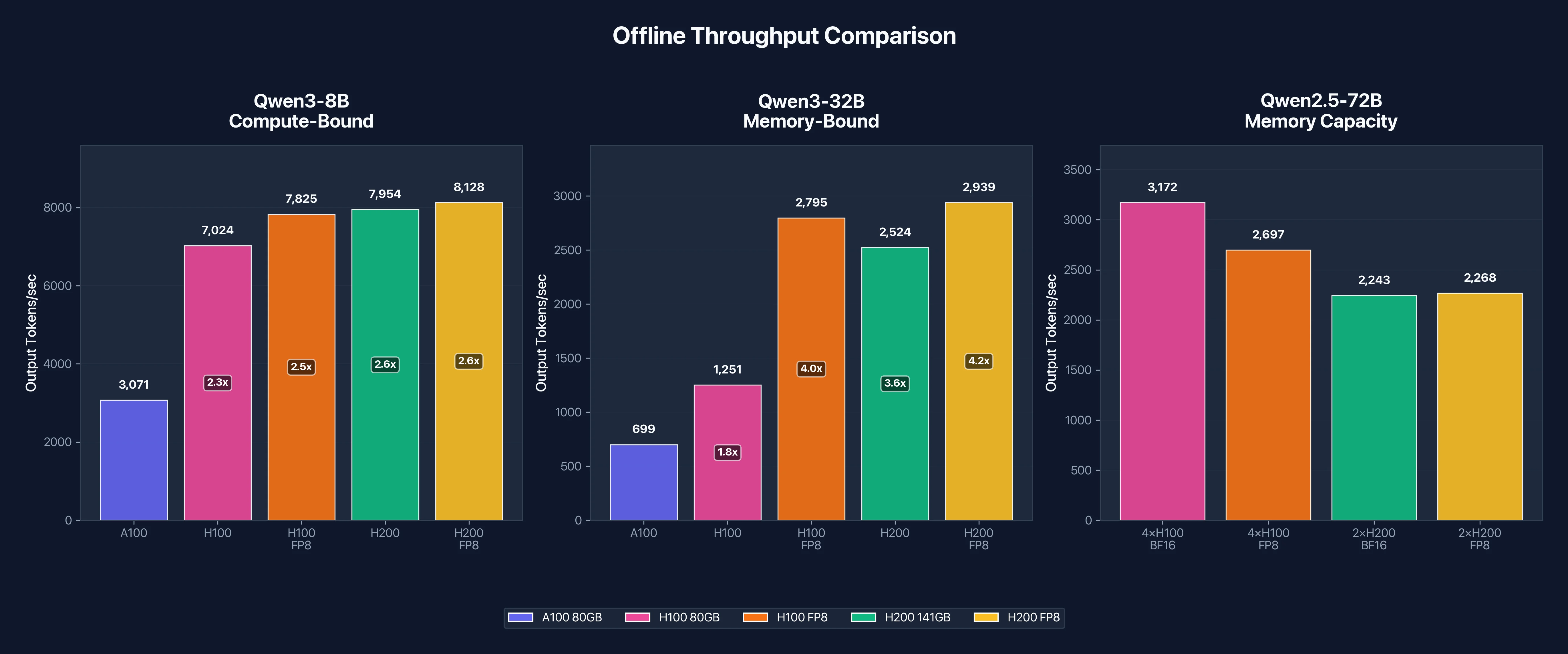 Figure 1: Offline throughput comparison across model sizes. Note how H200's advantage grows as models become more memory-bound.
Qwen3-8B Results: Compute-Bound Workload
Think of GPU inference like a factory. The workers (CUDA cores) do the actual calculations, while the supply chain (memory bandwidth) delivers the model weights they need. In a memory-bound workload, workers sit idle waiting for weights to arrive (the supply chain is the bottleneck). In a compute-bound workload, weights arrive fast enough that workers are always busy, so raw computational power becomes the limit.
The 8B model (~16GB in BF16) fits comfortably in all three GPUs with plenty of room to spare. This headroom lets vLLM batch many requests together, reusing the same weights across dozens of inputs per forward pass. More reuse means the workers stay busy, making this a compute-bound workload where TFLOPS matter more than TB/s.
Offline Throughput (Output tokens/second)
| GPU | BF16 | FP8 | Speedup vs A100 |
|---|---|---|---|
| A100 80GB | 3,071 | N/A | 1.0x (baseline) |
| H100 80GB | 7,024 | 7,825 | 2.29x |
| H200 141GB | 7,954 | 8,128 | 2.59x |
H100 delivers 2.29x the throughput of A100, which tracks closely with the theoretical compute advantage. The H200 edges slightly ahead at 2.59x, but the gap between H100 and H200 is only 13%. This confirms that 8B inference is compute-bound: H200's extra memory bandwidth doesn't help much when the model already fits comfortably in H100's 80GB.
FP8 quantization provides a modest 11% boost on H100 (7,024 to 7,825 tok/s) and minimal improvement on H200. For small models, FP8's memory savings don't translate to significant speedups because memory isn't the bottleneck.
Online Serving Latency
| Metric | A100 | H100 | H100 FP8 | H200 | H200 FP8 |
|---|---|---|---|---|---|
| Output tok/s | 1,074 | 1,896 | 2,109 | 2,284 | 2,176 |
| Mean TTFT | 47.8ms | 29.5ms | 28.2ms | 20.7ms | 20.0ms |
| Mean TPOT | 14.2ms | 8.0ms | 7.2ms | 6.7ms | 7.0ms |
| P99 TTFT | 192ms | 108ms | 106ms | 105ms | 74ms |
Under concurrent load, latency tells the real story. H100 cuts time-to-first-token from 48ms to 29ms (1.6x faster), and H200 pushes it down to 21ms (2.3x faster than A100). For chatbots and interactive applications, users notice latency improvements more than raw throughput.
The P99 latency (worst-case response time for 99% of requests) drops dramatically from 192ms on A100 to around 105ms on H100/H200. Tail latency matters for production APIs where occasional slow responses hurt user experience.
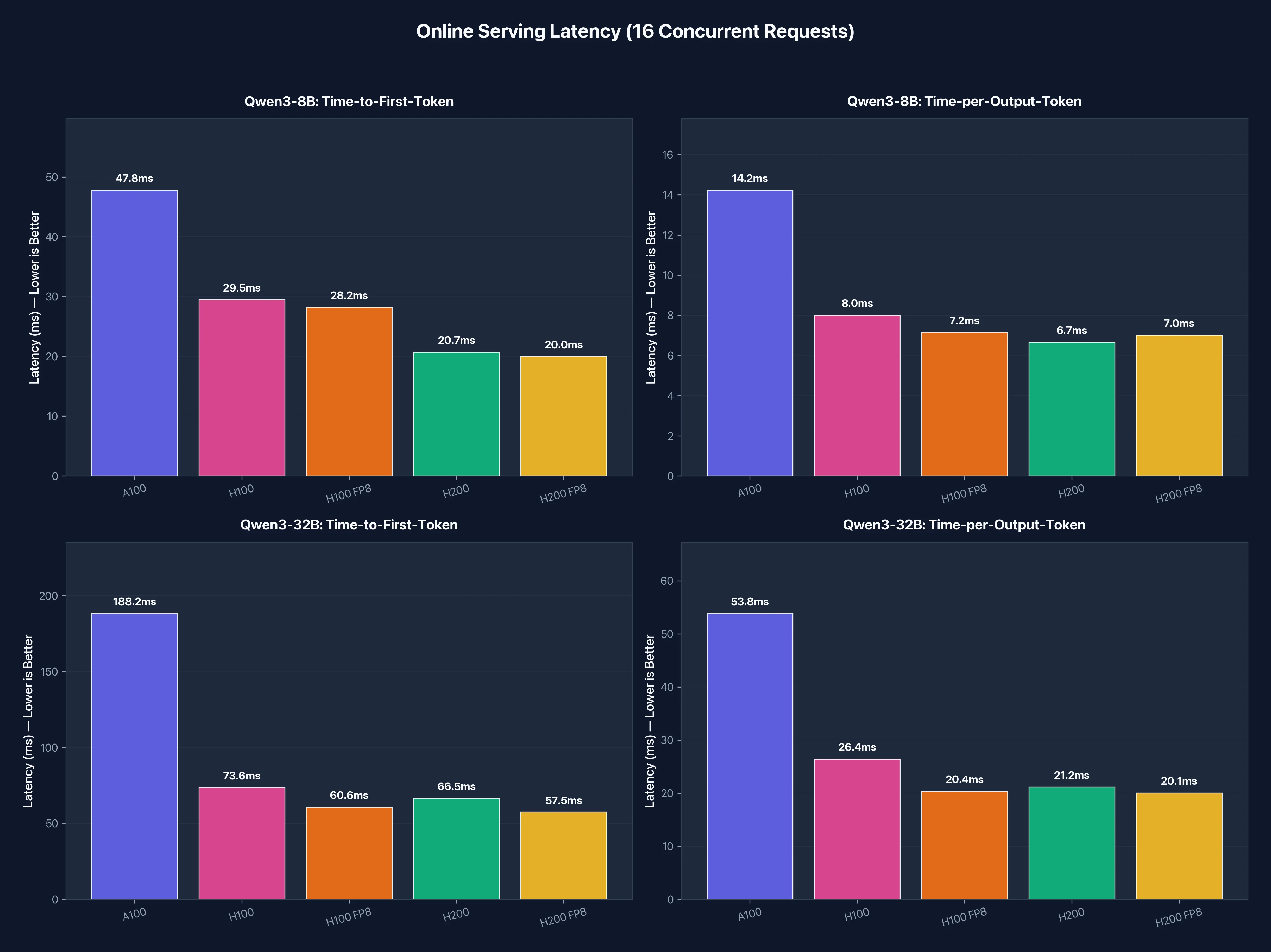 Figure 2: Online serving latency metrics. Lower is better. The Hopper GPUs (H100/H200) deliver 2x lower latency across all metrics.
Qwen3-32B Results: Memory-Bound Workload
At 32B parameters, the model consumes roughly 64GB in BF16. On 80GB GPUs (A100 and H100), that leaves only 16GB for KV cache and batching. The workers are now waiting for the supply chain. This shifts the bottleneck from compute to memory bandwidth.
Offline Throughput (Output tokens/second)
| GPU | BF16 | FP8 | Speedup vs A100 | FP8 Boost |
|---|---|---|---|---|
| A100 80GB | 699 | N/A | 1.0x (baseline) | N/A |
| H100 80GB | 1,251 | 2,795 | 1.79x | 2.23x |
| H200 141GB | 2,524 | 2,939 | 3.61x | 1.16x |
This is where the memory story gets interesting. H100's speedup over A100 drops to 1.79x for 32B compared to 2.29x for 8B. The reduced speedup indicates memory bandwidth is now limiting performance, not compute.
H200 pulls ahead significantly here. At 2,524 tok/s in BF16, it's 2.02x faster than H100 on the same model. This matches the memory bandwidth ratio: H200's 4.8 TB/s is 43% higher than H100's 3.35 TB/s, and combined with larger KV cache capacity, it delivers roughly double the throughput.
Why FP8 helps H100 so much here
Look at the FP8 Boost column: H100 jumps 2.23x while H200 gains only 1.16x. Why the difference?
Remember, H100 is memory-constrained with this 32B model. The 64GB model leaves only 16GB for KV cache and batching on an 80GB GPU. FP8 cuts the model size in half (64GB → 32GB), which does two things:
- Frees up memory: More room for KV cache means vLLM can batch more requests
- Reduces memory traffic: Half the bytes to move per forward pass
With more batching headroom, the workload shifts from memory-bound toward compute-bound. H100's strong TFLOPS can finally shine, and throughput more than doubles.
H200 tells a different story. With 141GB of memory, it was never that constrained to begin with. The 64GB model leaves 77GB of headroom, plenty for large batches. FP8 still helps (1.16x), but it's incremental rather than transformative.
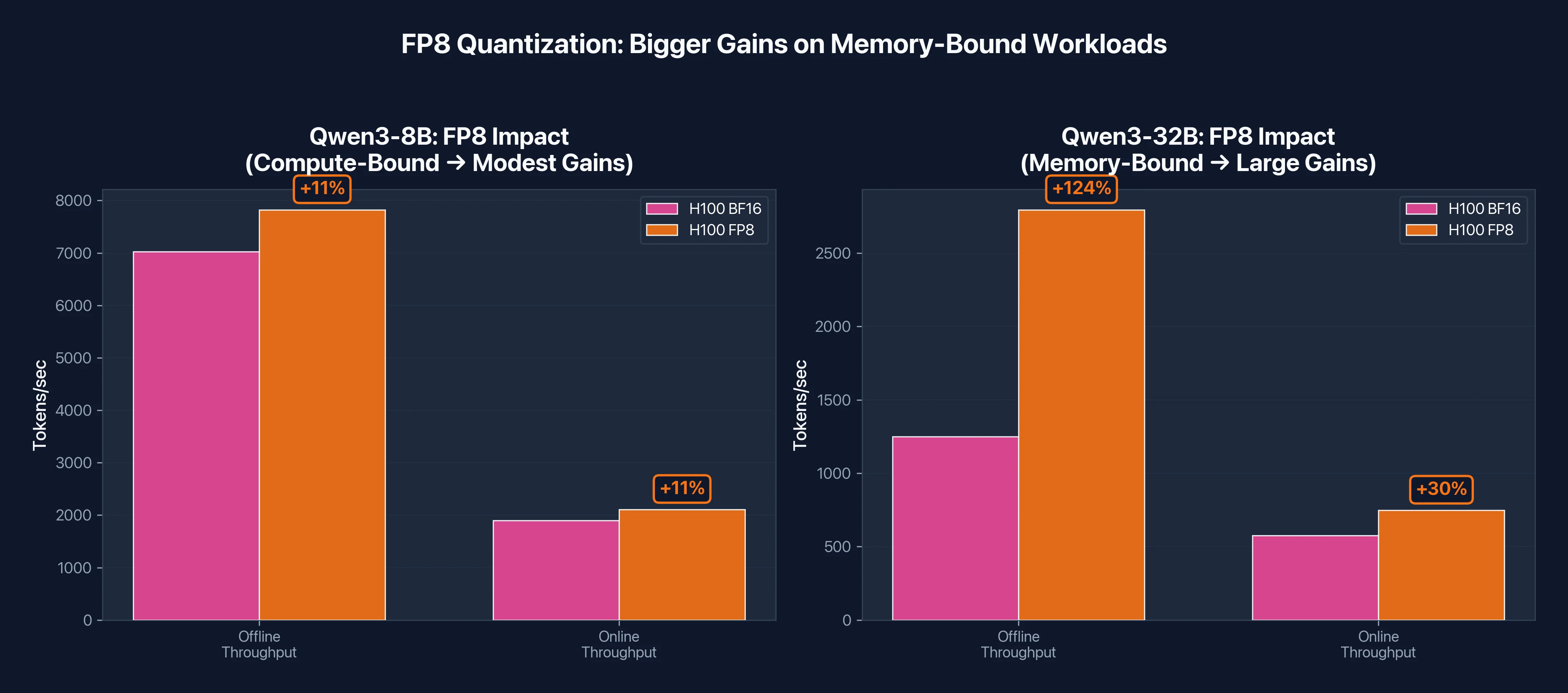 Figure 3: FP8 quantization impact on H100. Memory-bound workloads (32B) see 2x gains from FP8, while compute-bound workloads (8B) see modest 11% improvement.
Online Serving Latency
| Metric | A100 | H100 | H100 FP8 | H200 | H200 FP8 |
|---|---|---|---|---|---|
| Output tok/s | 283 | 576 | 749 | 718 | 762 |
| Mean TTFT | 188ms | 74ms | 61ms | 66ms | 58ms |
| Mean TPOT | 53.8ms | 26.4ms | 20.4ms | 21.2ms | 20.1ms |
| P99 TTFT | 677ms | 390ms | 322ms | 378ms | 286ms |
For production serving of 32B models, H100 and H200 both deliver roughly 2x lower latency than A100. Time-per-output-token drops from 54ms to the 20-26ms range, which means users see tokens streaming twice as fast.
The tail latency (P99 TTFT) improvement is substantial. A100's worst-case first token time of 677ms drops to 286-390ms on the Hopper GPUs. For conversational AI where users expect quick responses, this difference is noticeable.
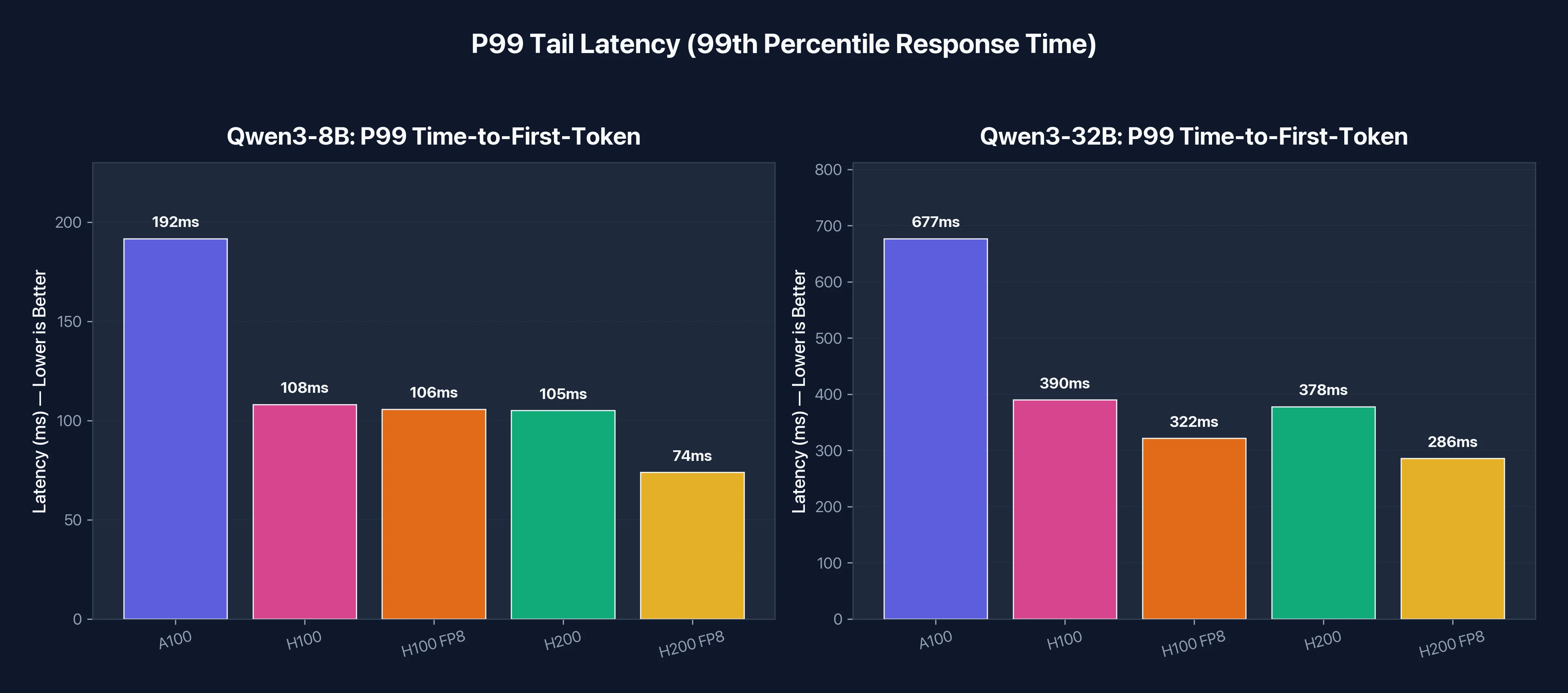 P99 tail latency comparison. For production APIs, the worst-case response time matters as much as the average.
Qwen2.5-72B Results: Where H200 Shines
The 72B parameter model reveals H200's true advantage: memory capacity, not just bandwidth.
Running 72B in BF16 requires approximately 144GB just for model weights. Neither A100 nor H100 can fit this on a single GPU. You need tensor parallelism across multiple GPUs, which introduces communication overhead and complexity.
Here's what we found:
| Configuration | GPUs Required | Works? | Notes |
|---|---|---|---|
| H100 TP=2 | 2 | ❌ | OOM, negative KV cache space |
| H100 TP=4 | 4 | ✅ | Limited to 4K context |
| H200 TP=2 | 2 | ✅ | Supports 8K+ context |
When we tried running 72B on two H100s (tensor parallel = 2), vLLM reported "Available KV cache memory: -3.05 GiB" and crashed. The model weights consumed nearly all available memory across both GPUs, leaving nothing for KV cache. We had to scale to four H100s to run the model.
Two H200s handled the same model without issues. With 282GB total memory (2 × 141GB), there's ample room for both the 144GB model and substantial KV cache. The extra headroom means you can run longer context lengths (8K and beyond) without hitting memory limits. This matters for document analysis, multi-turn conversations, and RAG applications.
Throughput Comparison
| Configuration | Online tok/s | Offline tok/s | Cost/hr (E2E) |
|---|---|---|---|
| 4× H100 BF16 | 486 | 3,172 | ₹996/hr ($11.19) |
| 2× H200 BF16 | 638 | 2,243 | ₹600/hr ($6.74) |
The 2× H200 setup achieves 71% of the offline throughput of 4× H100, but at 60% of the cost. On a cost-efficiency basis:
- 4× H100: 3,172 tok/s ÷ ₹996 = 3.18 tok/s per rupee ($0.98 per million tokens)
- 2× H200: 2,243 tok/s ÷ ₹600 = 3.74 tok/s per rupee ($0.84 per million tokens)
H200 delivers 18% better cost efficiency for 72B inference, and with a simpler setup that's easier to manage. Fewer GPUs means less communication overhead, simpler orchestration, and fewer potential failure points.
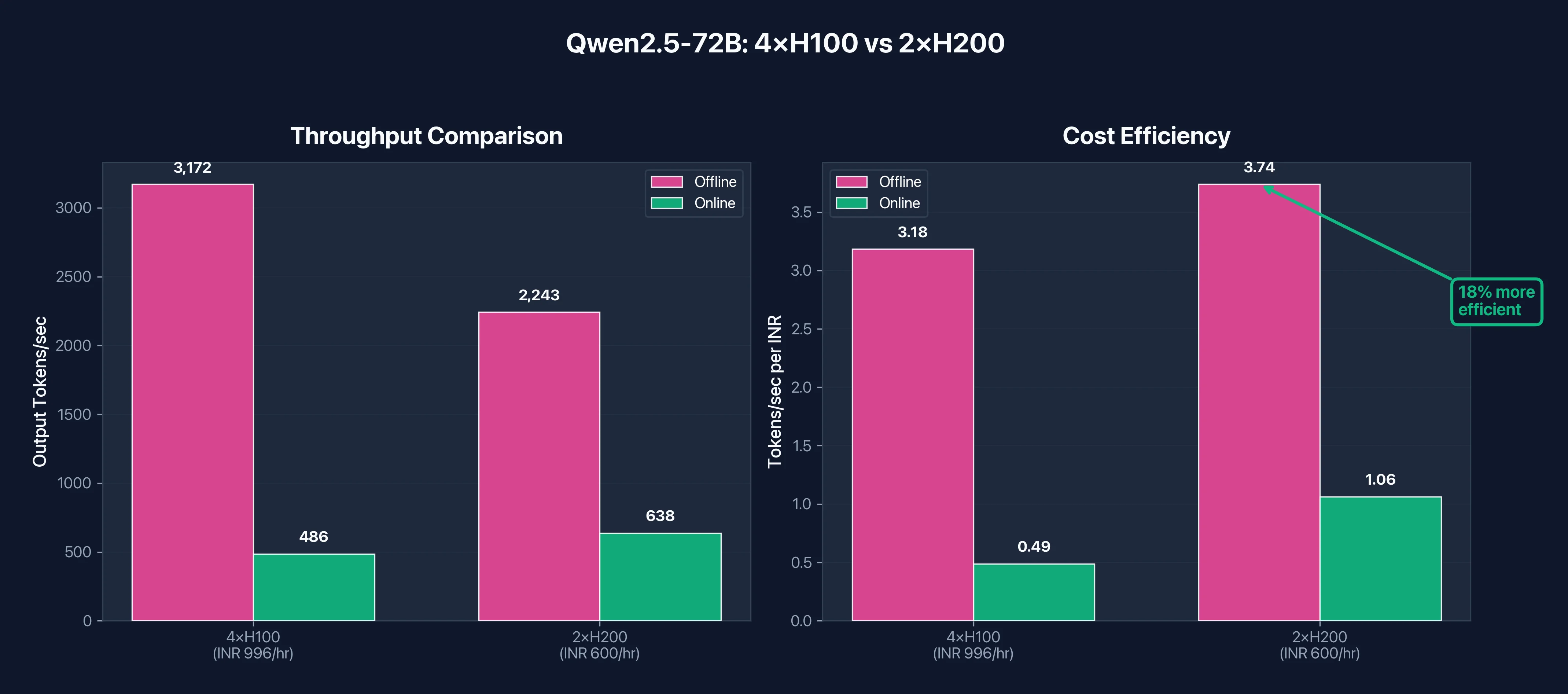 Figure 4: 72B model deployment comparison. While 4×H100 achieves higher raw throughput, 2×H200 delivers 18% better cost efficiency at 40% lower hourly cost.
A note on FP8: With FP8 quantization, 72B models shrink to ~72GB, which means a single H200 can potentially run them without tensor parallelism. For H100, FP8 enables running on 2 GPUs instead of 4, significantly reducing infrastructure complexity.
Key Takeaways
For 8B models (compute-bound):
- H100 is 2.3x faster than A100
- H200 offers minimal improvement over H100
- FP8 provides modest 10-15% gains
- Choose H100 at ₹249/hr (3.37)
For 32B models (memory-bound in BF16):
- H200 BF16 is 2x faster than H100 BF16
- H100 FP8 exceeds H200 BF16 by ~11% (2,795 vs 2,524 tok/s)
- If you can use FP8, H100 delivers the best value
- If you need BF16 precision, H200 is worth the premium
For 70B+ models (memory capacity):
- H100 requires 4 GPUs, H200 requires only 2
- H200 setup is 40% cheaper: ₹600/hr (11.19)
- H200 delivers 18% better cost efficiency
- Simpler architecture means easier deployment
The pattern is clear: as model size increases, H200's advantages compound. For small models, save money with H100. For large models, H200's extra memory pays for itself.
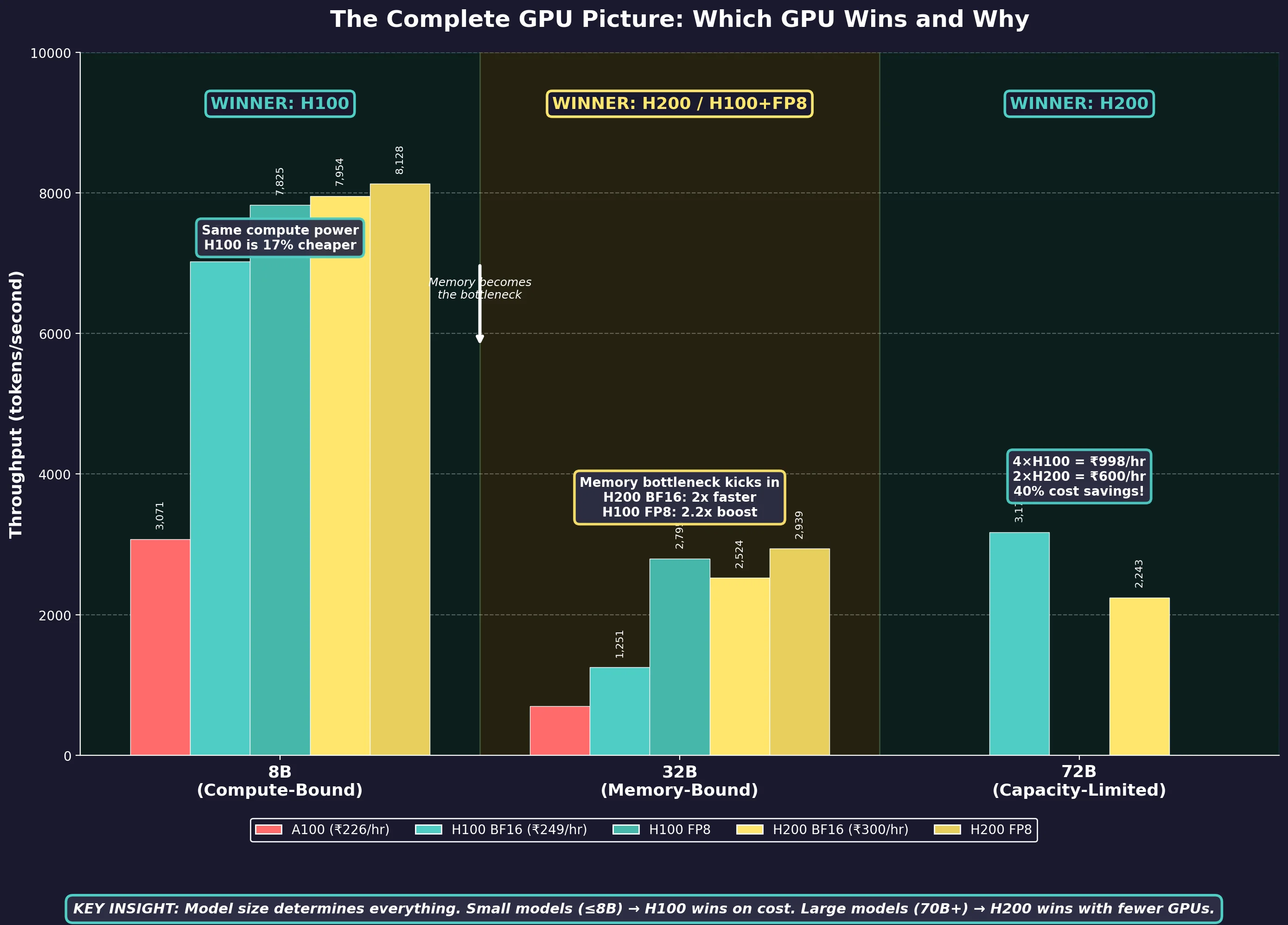
Figure 5: The complete picture: which GPU wins at each model size and why. This single chart summarizes our entire benchmark analysis: H100 dominates compute-bound workloads, while H200 takes the lead when memory becomes the bottleneck.
Use Case Decision Framework
The benchmarks tell you what each GPU can do. This section tells you which one to pick for your specific workload.
Training Workloads
For training, the decision mostly comes down to model size and whether you can use FP8.
| Your Workload | Recommended | Why |
|---|---|---|
| Models under 30B parameters | A100 or H100 | Both handle these efficiently. A100 saves money, H100 saves time |
| Models 30B-100B | H100 | FP8 and Transformer Engine cut training time by 2-3x vs A100 |
| Models 100B+ | H200 | Memory capacity becomes critical. Fewer GPUs = simpler distributed setup |
| Fine-tuning LLMs | H100 (small models), H200 (70B+) | Depends entirely on whether the model fits in 80GB |
| Computer vision (ResNet, YOLO, diffusion) | A100 | Memory is rarely the bottleneck. Best cost-efficiency |
A few notes on training. First, multi-GPU training benefits significantly from NVLink bandwidth. H100 and H200 both have 900 GB/s NVLink 4.0, which is 50% faster than A100's NVLink 3.0. For 8-GPU training runs, this reduces the communication overhead that slows down scaling. Second, if you're doing LoRA or QLoRA fine-tuning on models up to 70B, H100 is usually the sweet spot. The model itself is quantized to 4-bit, so memory isn't the constraint, and H100's compute advantage over A100 directly translates to faster iteration.
Inference Workloads
Inference decisions are more nuanced because latency requirements, batch sizes, and context lengths all affect which GPU wins.
| Your Workload | Recommended | Why |
|---|---|---|
| Batch inference (offline, high volume) | A100 or H100 | If latency doesn't matter, A100 offers best cost per token |
| Real-time APIs (P99 < 200ms) | H100 or H200 | Hopper's lower latency keeps tail responses fast |
| Long context RAG (16K-128K tokens) | H200 | KV cache grows linearly with context. H200's 141GB handles this |
| Multi-model serving | H100 with MIG | Partition one GPU into 7 isolated instances for different models |
| Production LLM APIs (70B+) | H200 | 2 GPUs instead of 4 means lower cost and simpler infrastructure |
The context length point deserves emphasis. KV cache memory scales with sequence length, batch size, and model dimensions. A 70B model with 32K context can easily consume 40-60GB just for KV cache, on top of the model weights. On 80GB GPUs, this forces you to either limit batch size or truncate context. H200's 141GB gives you room for both.
The Faster GPU Paradox
Here's the counterintuitive part: the more expensive GPU often costs less for the total job.
Consider fine-tuning a 70B model. On A100, this might take 100 hours. On H100, the same job completes in 40-50 hours due to 2-2.5x faster training throughput.
| GPU | Time | Hourly Rate | Total Cost |
|---|---|---|---|
| A100 | 100 hours | ₹226/hr ($2.54) | ₹22,600 ($254) |
| H100 | 45 hours | ₹249/hr ($2.80) | ₹11,223 ($126) |
H100 costs 50% less despite a higher hourly rate. The math works because H100's speed advantage (2.2x) outweighs its price premium (10%).
This logic applies differently to H200. Since H200 and H100 have identical compute, H200 only saves money when memory is the bottleneck. For a 70B model where H100 needs 4 GPUs but H200 needs 2, H200 wins on total cost. For a 13B model where both need 1 GPU, H100 wins.
The rule: Always calculate total job cost, not hourly rate. Run a quick benchmark on your actual workload, multiply by the hourly rate, and compare.
Once you've figured out which GPU fits your workload, the next question is where to actually run it. E2E Networks operates India's largest NVIDIA H200 deployment (2,048 GPUs across Delhi NCR and Chennai), and offers all three GPUs with spot pricing that cuts costs by 70%.
Getting Started on E2E Networks
Note on pricing: All USD conversions use the exchange rate at the time of writing (1 USD = ₹89). Actual rates may vary. See the full GPU cloud pricing page for current rates.
GPU Pricing
| GPU | On-Demand | Spot | Memory |
|---|---|---|---|
| A100 80GB | ₹226/hr ($2.54) | - | 80GB HBM2e |
| H100 80GB | ₹249/hr ($2.80) | ₹70/hr ($0.79) | 80GB HBM3 |
| H200 141GB | ₹300/hr ($3.37) | ₹88/hr ($0.99) | 141GB HBM3e |
Multi-GPU configurations are available in 1, 2, 4, and 8 GPU nodes. Pricing scales linearly, so a 4×H100 node costs ₹996/hr (26.97). All multi-GPU instances include NVLink interconnects.
Savings plans: E2E offers committed pricing for monthly and yearly plans. The longer your commitment, the more you save. Contact sales for custom quotes on high-volume usage.
Spot Instances
Spot instances cut GPU costs by 70-72%. H100 spot runs at ₹70/hr (0.99).
E2E is one of the very few cloud providers in India offering spot instances for high-end GPUs like H100 and H200. While AWS, GCP, and Azure offer GPU spot pricing in their international regions, Indian teams using those providers face 150-300ms latency and forex exposure. E2E's spot instances give you the same 70%+ discount model with Indian data residency and INR billing.
A full day on H200 spot costs roughly ₹2,112 ($24). That's frontier-class hardware for less than what many teams spend on API inference costs.
When spot makes sense:
- Batch processing and offline inference where interruption is acceptable
- Hyperparameter tuning across multiple runs
- Development, prototyping, and experimentation
- Training jobs with checkpointing (you can resume if preempted)
When to use on-demand:
- Production inference APIs that need guaranteed uptime
- Time-sensitive deadlines where preemption would be costly
- Long training runs without frequent checkpoints
Self-Service Access
Unlike hyperscalers where you submit quota requests and wait days (or weeks) for approval, E2E lets you sign up, add credit, and launch a GPU instance in minutes. If the capacity exists, you can use it immediately. This matters when you need to scale quickly for a deadline, or when you want to benchmark a workload on H200 before committing. You can spin up an instance for an hour, run your tests, and decide.
For Teams in India
Data stays within Indian borders, under Indian legal jurisdiction. For banking, healthcare, and government workloads, this is often a requirement.
Latency to Indian users drops from 150-300ms (US/Singapore regions) to sub-50ms from E2E's data centers. INR billing eliminates forex exposure. MeitY empanelment means the infrastructure is pre-approved for public sector workloads.
How to Start
- Sign up at e2enetworks.com
- Complete KYC verification
- Add prepaid credit
- Launch your GPU instance from the dashboard
The entire process takes minutes. You can be running inference on an H200 the same day you decide you need one.
Conclusion
There's no universally "best" GPU. The right choice depends on whether your workload is compute-bound or memory-bound. For small models under 30B parameters, H100 delivers excellent performance at a reasonable price. For large models above 70B, H200's memory capacity reduces infrastructure complexity and often costs less overall. A100 remains viable for budget-conscious teams running established workloads.
The key insight: Always calculate total job cost, not hourly rate. A faster GPU at a higher price often costs less when you account for time saved.
Frequently Asked Questions
What is the difference between A100, H100, and H200 GPUs?
A100 (2020) uses Ampere architecture with 80GB HBM2e memory at 2.0 TB/s bandwidth. H100 (2022) uses Hopper architecture with the same 80GB capacity but faster HBM3 memory at 3.35 TB/s, plus native FP8 support and the Transformer Engine. H200 (2024) uses the same Hopper architecture as H100 but upgrades to 141GB HBM3e at 4.8 TB/s. The key difference: A100 to H100 was a compute upgrade (3x faster). H100 to H200 was a memory upgrade (76% more capacity, 43% more bandwidth, identical compute).
How much faster is H100 than A100 for AI training?
H100 delivers 2-3x faster training than A100 for most AI workloads. NVIDIA reports up to 4x speedup for GPT-3 class models. Our vLLM inference benchmarks showed 2.29x throughput improvement on 8B models. The gains come from three sources: 3x more compute throughput, 67% higher memory bandwidth, and native FP8 support that A100 lacks entirely. For transformer-based models, the Transformer Engine provides additional optimization by automatically managing mixed-precision training.
H100 vs H200: Which GPU should I choose for LLM inference?
Choose H100 if your model fits comfortably in 80GB with room for KV cache. This covers most models under 30B parameters and many 30-70B models with FP8 quantization. Choose H200 when memory is the bottleneck: 70B+ models in BF16, long context inference (16K+ tokens), or when you need large batch sizes. H200's 141GB lets you run 72B models on 2 GPUs where H100 needs 4, making H200 cheaper despite higher per-GPU cost.
How much memory does H100 have compared to A100 and H200?
A100 has 80GB of HBM2e memory with 2.0 TB/s bandwidth. H100 has 80GB of HBM3 memory with 3.35 TB/s bandwidth (same capacity, 67% more bandwidth). H200 has 141GB of HBM3e memory with 4.8 TB/s bandwidth (76% more capacity than H100, 43% more bandwidth). Memory capacity determines what models fit on a single GPU. Memory bandwidth determines how fast you can stream weights during inference, which directly affects tokens per second.
What is FP8 and which NVIDIA GPUs support it?
FP8 is an 8-bit floating point format that halves memory usage compared to FP16/BF16. Only H100 and H200 support native FP8 through their fourth-generation Tensor Cores. A100 cannot run FP8 operations. FP8 matters because it reduces memory footprint (fitting larger models on fewer GPUs) and cuts memory bandwidth requirements (faster inference). Our benchmarks showed H100 achieving 2.23x speedup on 32B models when switching from BF16 to FP8. The Transformer Engine manages FP8 precision automatically.
How much do A100, H100, and H200 GPUs cost?
On E2E Networks: A100 80GB costs ₹226/hr (2.80), and H200 141GB costs ₹300/hr (0.79) and H200 at ₹88/hr ($0.99), cutting costs by 70-72%. Multi-GPU pricing scales linearly. Savings plans are available for monthly and yearly commitments. The hourly rate doesn't tell the full story though. H100 often costs less total than A100 because jobs finish 2-3x faster.
What is the best GPU for training large language models?
For models under 30B parameters, H100 offers the best balance of speed and cost. For models 30-100B, H100 remains the sweet spot due to FP8 support and Transformer Engine optimization. For models above 100B, H200's memory capacity becomes critical because it reduces the number of GPUs needed for tensor parallelism. A100 is still viable for smaller models or when budget is the primary constraint, but H100's 2-3x speed advantage often makes it cheaper on total job cost.
What is the Transformer Engine in H100 and H200?
The Transformer Engine is a software library that leverages specialized hardware in Hopper GPUs (H100/H200) to automatically manage mixed-precision computation for transformer models. It analyzes each layer and determines optimal precision, running matrix multiplications in FP8 where safe and switching to FP16 for sensitive operations like normalization and softmax. It handles per-tensor scaling factors automatically, which would otherwise require manual tuning. A100 lacks this capability entirely. From a developer perspective, you wrap your model in a context manager and the Transformer Engine handles precision management.
When should I choose A100 over H100 or H200?
Choose A100 when: you're running models under 20B parameters where compute (not memory) is the bottleneck, budget is your primary constraint, or you have existing A100-optimized workflows. A100 delivers 80-90% of what most teams need at roughly 90% of H100's hourly cost. However, for new deployments, H100 often makes more sense because jobs complete 2-3x faster, making total cost lower despite higher hourly rates. A100 is end-of-life, so supply is finite and shrinking.
What is the difference between SXM and PCIe variants of these GPUs?
SXM GPUs use a specialized socket with direct power delivery and NVLink connectivity. PCIe GPUs use standard PCIe slots. H100 SXM has 16,896 CUDA cores with HBM3 at 3.35 TB/s. H100 PCIe has 14,592 CUDA cores with HBM2e at 2.0 TB/s. That's roughly 24% less compute and 40% less memory bandwidth. For LLM inference where memory bandwidth matters, the real-world performance gap can reach 40-60%. E2E Networks and major cloud providers deploy SXM variants for high-performance AI workloads.